
Memory Layer: What to Remember Across Sessions, When to Read It, and When to Retire It
| Difficulty | Reading time | Last verified | Author |
|---|---|---|---|
| Intermediate | 14 minutes | 2026-07-11 | LearnPrompt Editorial Team |
In your last session, you spent ten minutes explaining this project’s build command, directory conventions, and that counterintuitive pitfall to an Agent. Today, you open a new session and it behaves as if none of it happened: it still does not know to run setup first, changes the same file incorrectly again, and makes you explain everything from scratch.
Most people next copy and paste those conventions into every conversation, or simply stuff the entire previous chat history back in. But the longer the context gets, the less reliably it is followed—and you pay tokens again every time. The real problem is which information is worth keeping across sessions, how to keep it structured, when to read it back, and when to discard it. That is the memory layer. It is not the same as stuffing all history into context: memory consists of selected, compressed, persistent facts that can be audited and retired.
What you will be able to do after reading
Section titled “What you will be able to do after reading”You will learn to put any piece of information in the right bucket, and give cross-session memory a discipline:
- Classify by lifecycle: current context, task state, durable project instructions, automatic memory, and raw evidence.
- Decide whether a piece of information belongs in cross-session memory, and why.
- Recall through relevance gating instead of pouring the whole memory store into context.
- Retire memory at three boundaries: expiration, contamination, and privacy.
- Explain what Claude Code’s auto memory and CLAUDE.md are, what Codex’s AGENTS.md and experimental memories are, and avoid mixing them into one vocabulary.
You will also run a minimal repository and see for yourself how two independent processes repeat the same error without memory, and how a completely new process reads an auditable lesson after it has been written and avoids that error.
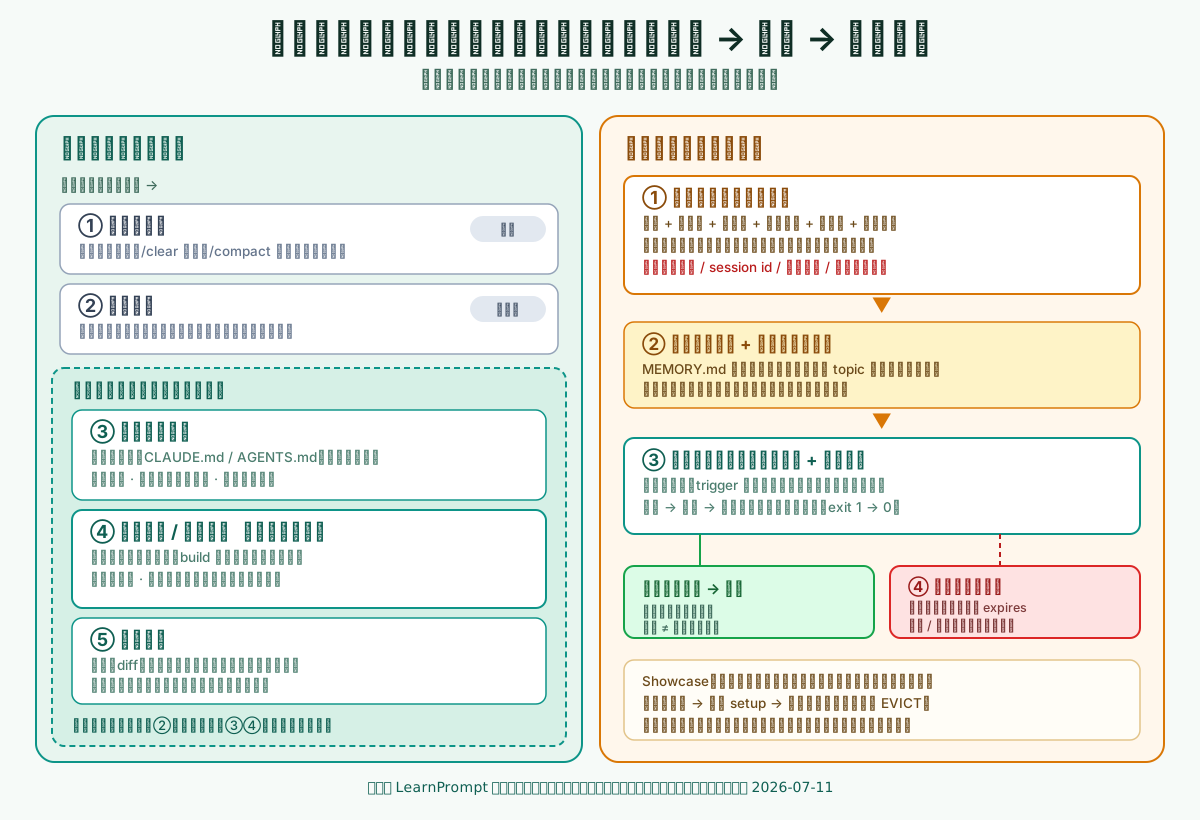 Caption: The left side decides what belongs in cross-session memory; the right side decides when it is read and when it is retired. The green box on the recall path deliberately highlights “zero effect if not recalled,” because memory does not mean the model remembers automatically.
Start with a failure: a new process trips over the same pitfall again
Section titled “Start with a failure: a new process trips over the same pitfall again”Suppose there is a small task: run the verification command node src/build-token.mjs. It reads data/fixture.json, a file produced during setup that is in .gitignore and not committed. It is absent by default in a fresh clone or a fresh process.
A process with no memory that runs the verification directly hits this error:
$ node scripts/run-session.mjs --mode no-memory --today 2026-07-11FAIL build-token:缺少 data/fixture.json —— 该文件由 setup 生成、不入库(.gitignore),全新进程默认不存在;必须先运行 node src/setup.mjsresult: exit=1It may explore on its own for a while and eventually get through. But unless it leaves this lesson behind, the next independent process starts at zero and hits exactly the same error—the second no-memory process in the Showcase does precisely this: the same input and the same exit 1. This is not because the model is unintelligent; every session begins with a fresh context window, and nobody hands it what was learned last time. The root cause of repeating mistakes and repeated reviews across sessions is a missing memory layer that can persistently carry lessons, not insufficiently earnest prompting.
The memory layer reuses knowledge across sessions; it does not hoard context
Section titled “The memory layer reuses knowledge across sessions; it does not hoard context”The memory layer answers only one question: what should be remembered across sessions and processes? Its boundary with current context is clear—context is the workspace for this conversation and disappears when the session ends or is compacted; memory is the selected persistent facts worth using again next time.
Claude Code’s official documentation describes this mechanism directly: every session begins with a fresh context window and carries knowledge across sessions through two complementary mechanisms. One is the CLAUDE.md you write, which holds instructions and rules; the other is auto memory, which the model writes itself and uses for lessons and patterns it discovers. Both load at the start of every session, but both are treated as context rather than enforced configuration. In other words, writing something into memory does not guarantee strict compliance; to actually block an action, use a PreToolUse hook—that belongs to the constraints layer. The memory layer is responsible for “still useful next time,” not “must be followed this time.”
This boundary determines the memory layer’s discipline: do not hoard chat histories; select the small number of reusable cross-session facts, compress them into an index, and recall them when needed.
Five buckets by lifecycle
Section titled “Five buckets by lifecycle”To decide where a piece of information belongs, the most useful measure is lifecycle: how long it can live, who writes it, and who reads it back when. By that measure, the information we routinely deal with can be divided into five buckets.
| Bucket | Lifecycle | Who writes / when it is read | Typical content | Owning layer |
|---|---|---|---|---|
| Current context | This session | Both parties / now | Exchanges in this conversation, temporary reasoning | Context, not memory |
| Task state | One task | Orchestration / across turns but within the task | Goal, progress, evidence from the last failure | State layer |
| Durable project instructions | Cross-session | Human / fully loaded every time | Rules in CLAUDE.md and AGENTS.md | Instruction layer (overlaps with memory) |
| Automatic memory | Cross-session | Model / index loaded, details on demand | Build commands, debugging insights, preferences | Core of the memory layer |
| Raw evidence | Cross-session (externalized) | System / referenced by pointer | Logs, diffs, test reports | Pointed to by memory, not inlined |
The memory layer manages the bottom three buckets: durable project instructions, automatic memory, and raw evidence—all information that only makes sense across sessions, with automatic memory at its core. The top two do not belong to it: current context is the workspace of this turn, and task state belongs to the state layer.
The most common error is putting information in the wrong layer. If you write “the temporary conclusion of this turn” down as permanent memory, it becomes misleading next time. Conversely, if you do not write a cross-session fact such as “this project must always run setup first” into memory, and instead repeat it through context every turn, you continually pay for missing memory. Bucketing is not an academic classification; it determines whether a piece of information is worth crossing the session boundary.
What to save, and why to save it
Section titled “What to save, and why to save it”Cross-session memory should save the things that “you would otherwise have to explain repeatedly.” Claude Code’s official documentation provides a practical list of “when to write something into memory,” which almost defines why to save it:
- The model makes the same mistake a second time.
- A code review catches a project convention it should have known.
- You type the same correction again that you already made in the previous session.
- A new teammate needs the same background to get started.
What these four situations have in common is repetition. Auto memory uses the same criterion: the model does not save everything every time. It saves information only when it judges that it will remain useful in future sessions—typically reusable facts such as build commands, debugging insights, architectural notes, and code-style preferences.
A memory worth saving should not be only a conclusion. It should include fields that make it reusable and auditable. The lesson in the Showcase is written like this:
---name: fixture-before-verifyscope: this-repotrigger: [build-token, verify, fixture]verified_at: "2026-07-11"expires: "never"kind: durable-lesson---事实:跑 build-token 之前必须先跑 setup。为什么:data/fixture.json 是生成物、不入库,全新进程默认不存在。怎么用:任何一次校验前先生成 fixture,再校验。证据指针:showcase/memory-recall/result.txt 阶段 1。The fact, why, how to use it, verification date, scope, and evidence pointer let the next process execute the memory directly and let a person audit it later. The evidence pointer is especially important: memory is a compressed index of facts, not a place to copy a whole log. Instead, it points to where the raw evidence lives. This saves context while preserving traceability. Compression does not mean losing information; it keeps details in their original place and leaves only an entry point for retrieving them in memory.
When to read: recall is gated, not wholesale injection
Section titled “When to read: recall is gated, not wholesale injection”Saving is only half the work. Reading is the other half, and it is easier to overlook. A natural but mistaken idea is that once something has been recorded, it should be inserted in full into context every time. Once the memory store grows, it fills the context and compliance gets worse instead.
Official auto memory compresses reading into two layers, which demonstrates the right approach. A MEMORY.md in the memory directory serves as an index. At the start of each session, only its first 200 lines or first 25 KB are loaded, whichever comes first; anything beyond that is not loaded at startup. Detailed topic files such as debugging.md are not loaded at startup at all; the model reads them with file tools only when needed. In other words, the context gets a concise directory, and details are fetched on demand. This is relevance gating plus index compression: read the index first, then go deeper only when it matches the current task.
The Showcase makes this discipline concrete with a minimal recall gate. It decides whether a memory is relevant to the current task by its trigger and retrieves only matches:
$ node scripts/recall.mjs build-token --today 2026-07-11RECALL fixture-before-verify [durable-lesson]RECALL mirror-slow-on-0711 [one-time-state]summary: 2 recalled, 0 evictedAfter recall, a fresh process follows the lesson by running setup first, then verifies successfully in one pass:
$ node scripts/run-session.mjs --mode with-memory --today 2026-07-11RECALL fixture-before-verify [durable-lesson]setup:已生成 data/fixture.jsonPASS build-token:fixture.json 就位,token=ready-2026result: exit=0The change from exit 1 to exit 0 is not because this process is smarter; it read the lesson left by the previous one.
When to retire: expiration, contamination, and privacy
Section titled “When to retire: expiration, contamination, and privacy”Memory decays, so it must have retirement. Three situations require active cleanup.
Expiration is the easiest one to overlook. A one-time environmental state—such as “the intranet mirror is flaky today, and setup is occasionally slow”—is not a durable project fact and no longer holds after that day. If you keep it as permanent memory, the next process will make judgments based on something that is no longer true. Give these entries an expires value and retire them when recalled after expiry. When the Showcase advances time beyond expiration, that one-time state is stopped at the gate, while the durable lesson continues to be recalled:
$ node scripts/recall.mjs build-token --today 2026-07-13RECALL fixture-before-verify [durable-lesson]EVICT mirror-slow-on-0711 — 已过期(expires 2026-07-12 < 2026-07-13),不注入summary: 1 recalled, 1 evictedContamination is turning something that should not persist into permanent memory. Task state, one-time conclusions, and temporary hypotheses written into the memory store will mislead other processes later. The official guidance also positions CLAUDE.md as facts that every session should hold. Multi-step flows or rules that apply only locally should move down into a skill or a path-gated rule instead of being crammed into entry memory. When two memories contradict one another, the model may choose either one; that is itself the cost of contamination.
Privacy is a hard boundary. Never write secrets, session IDs, absolute paths, or private user history into memory. Auto memory is plaintext Markdown stored locally on the machine; it can be audited with /memory and deleted directly. Precisely because it is a file people can read, sensitive information must not be left in it. Actually preventing writes is the constraints layer’s responsibility; the discipline on the memory layer side is to avoid actively retaining any sensitive data. This article’s Showcase follows the same line: its memory entries contain no secrets, session IDs, or absolute paths.
Do not mix different products’ memory mechanisms into one system
Section titled “Do not mix different products’ memory mechanisms into one system”The easiest mistake in the memory layer is to treat features from different products as the same thing. Their names, writers, and loading mechanisms differ. Talking about them as though they are interchangeable creates configurations that neither work nor provide the security you think they do. Verification date: 2026-07-11.
Claude Code (local 2.1.206) has two parallel mechanisms:
- CLAUDE.md is durable instruction written by you. It is assembled from managed → user → project → local levels, from the root to the working directory; ancestor directories are fully loaded. The official recommendation is to keep a single file under 200 lines. It can import with
@path(up to four hops). It belongs to the instruction layer and overlaps with the memory layer only because it persists across sessions. - Auto memory is memory written by the model itself. It is stored under
~/.claude/projects/<project>/memory/, organized by Git repository, shared across worktrees, and local to the machine. It requires v2.1.59 or later, is enabled by default, and can be audited or turned off with/memory. Its loading rules were covered above: theMEMORY.mdindex enters context, while topic files are read on demand.
One point is easy to confuse: Claude Code reads only CLAUDE.md, not AGENTS.md. To have them share content, import @AGENTS.md in CLAUDE.md or create a symlink. In addition, when compacting, the project-root CLAUDE.md is reread from disk and reinjected after /compact, but nested CLAUDE.md files in subdirectories are not automatically reinjected. This determines which instructions can survive a compaction.
Codex (local codex-cli 0.142.2) is a different system. codex features list shows memories as an experimental feature and auto_compaction as stable; sessions can resume, fork, and archive. Its documented cross-session “guidance” mechanism is AGENTS.md—an instruction mechanism in which multiple files are merged from root to leaf, with project_doc_max_bytes defaulting to 32 KiB. In other words, Codex’s memories is currently an experimental switch. This article states only its existence and status, without speculating about its recall or retirement semantics. If you use it, rely on the official documentation; do not treat it as a synonym for Claude Code’s auto memory.
Remember the boundary in one sentence: Claude Code’s auto memory and Codex’s memories are different implementations in different products; CLAUDE.md and AGENTS.md are two instruction mechanisms that do not read one another. Configure each according to its own official documentation; do not apply one product’s configuration to the other.
How the memory layer divides work with the other four layers
Section titled “How the memory layer divides work with the other four layers”The memory layer is useful, but it is responsible only for “what to remember across sessions.” It does not handle this turn’s work, real-time signals, decisions, or scheduling. If you do not distinguish the boundaries, you will force problems that belong elsewhere into memory.
- The instruction layer answers “how work should be done.” CLAUDE.md is durable instruction you write; it overlaps with memory, but it contains human-written rules, not lessons the model learned.
- The state layer answers “what must be remembered during this task.” Goals, progress, and evidence from the last failure belong to task state and should be discarded when the task ends. Memory is for things retained across sessions. Do not write task state as permanent memory, and do not force cross-session facts to be restated through state every turn.
- The feedback layer answers “what signal was just received from the environment in this turn.” Feedback is immediate within the loop and refreshed with every action. It can become a memory, but it is not itself memory.
- The orchestration layer answers “who reads memory, when it is recalled, and when to stop.” The step at which recall happens and whether to reopen a clean context after failure are orchestration control flow; memory only supplies the content that is read.
A simple test: if a piece of information remains useful in another session and is worth auditing and retiring, it is the memory layer’s work. If it matters only in this turn or task, hand it to context or the state layer.
Showcase: without memory, repeated errors; after one lesson is written, an independent process reads it and avoids them
Section titled “Showcase: without memory, repeated errors; after one lesson is written, an independent process reads it and avoids them”To ensure that “memory determines whether similar errors can be avoided” is more than a slogan, this article includes a minimal repository with no network dependency. It preserves the complete reproducible path from “repeating an error without memory” to “avoiding it after recall.” See the full directory, commands, and redacted output in Research and Showcase.
The task is a verification script that depends on an uncommitted fixture artifact that must be generated first. Five phases connect the entire chain: two independent no-memory processes each hit the same error (repeated error); after writing a lesson containing the fact, why, how to use it, and verification date, the recall gate retrieves it; a completely new process recalls before acting and passes verification; after advancing time beyond expiry, one-time state is retired while the durable lesson survives; finally, a process with “memory on disk but no recall” still repeats the error:
$ node scripts/run-session.mjs --mode skip-recall --today 2026-07-11FAIL build-token:缺少 data/fixture.json —— …必须先运行 node src/setup.mjsresult: exit=1This Showcase proves that avoiding similar errors across sessions depends on whether a lesson has been written down in structured form and recalled into the next session. It does not prove that recall.mjs is any product itself; it is only a minimal reproducible model of two reading disciplines—relevance gating and expiration retirement. Actual products’ recall and retirement semantics are governed by their official documentation. It also makes no model rankings: the entire process is offline, runs no online large model, and uses deterministic scripts. The most important limitation is written in the last phase: if memory is on disk but is not recalled, the lesson has zero effect. Memory does not mean the model remembers automatically; it is retrieval through “write to disk plus inject on recall.” Without the recall step, even the best-written memory will not return on its own.
When the memory layer should not be used to solve the problem
Section titled “When the memory layer should not be used to solve the problem”The memory layer is not a master key. In the following situations, do not rush to write into memory:
- The failure comes from a missing tool or insufficient permission. That belongs to the capabilities layer or constraints layer; no number of recorded lessons can conjure a command that does not exist.
- You need a hard block rather than a reminder. “Never delete the production database” must be blocked before the action by a deny rule, sandbox, or PreToolUse hook; writing it into memory is only a soft reminder.
- The information matters only in this turn or task. Put temporary conclusions in context and task progress in state; do not let them cross the session boundary and become contamination.
- The same problem has already been repeatedly contaminated by failed attempts. The correct action is to reopen a clean context and start again with a better prompt, not carry confused history forward as memory.
One test: if writing a piece of information down lets the next session avoid a detour, and that information is worth auditing and expiring, it is the memory layer’s work. If it cannot change the environment, tools, or mandatory boundaries—or will not even outlive this task—solve it in another layer.
Exercise: find the right bucket for one piece of information
Section titled “Exercise: find the right bucket for one piece of information”Find something recently made you think “I had to explain that again after switching sessions,” or a pitfall you repeatedly encounter, and fill out this table:
Information: State what it is in one sentenceLifecycle: This turn / this task / cross-sessionCorrect bucket: Current context / task state / durable project instructions / automatic memory / raw evidenceWhy retain it: Otherwise, will it cause repeated explanation or repeated mistakes?When to retire it: Permanently valid, or should it have an expires value?Privacy check: Are there any secrets / session IDs / absolute paths to remove?If it lasts only for this turn, do not write it into memory. If it is reusable across sessions, write it as a lesson with the fact, why, how to use it, and verification date, then give it a scope and expiration policy. Then perform a critical verification: switch to an entirely new process or session and, relying only on recalling this memory, see whether it can avoid the original detour.
Completion criteria: this information can be clearly assigned to one of the five buckets; a cross-session item can be recalled and reused once by an independent process; and every sensitive field has been removed. If you find that “I wrote it down, but it did not come back by itself next time,” the missing piece is not memory itself but recall—memory does not mean automatic remembering.
Sources and further reading
Section titled “Sources and further reading”- Claude Code official documentation: How Claude remembers your project
- Claude Code official documentation: Hooks (PreToolUse, hard blocks)
- OpenAI Codex official documentation: Custom instructions with AGENTS.md
- Anthropic: Effective harnesses for long-running agents
- Harness Engineering Orange Book
- This article’s research package and runnable Showcase
The first four items are official primary sources supporting all current product behavior in this article, verified with local Claude Code 2.1.206 and codex-cli 0.142.2 on 2026-07-11. The auto-memory rules “load the first 200 lines or 25 KB of MEMORY.md” and “requires v2.1.59 or later” describe the current implementation, while Codex memories is experimental; all may change with versions. The Orange Book, a secondary Chinese-language thematic map, helps establish the memory layer’s place in the harness narrative. Its repository is an educational sharing resource requiring attribution; this article retains its link and attribution, but copies none of its images or extended text. The five-bucket classification and the three-stage write/recall/retire discipline are LearnPrompt’s operational synthesis of official mechanisms, not an industry-wide standard; the Showcase in this article has been reorganized and rechecked.