
Checklist Skill Design: Upgrade 'Listing Issues' into an Executable Release Gate
| Difficulty | Reading time | Last verified | Author |
|---|---|---|---|
| Intermediate | 15 minutes | 2026-07-12 | LearnPrompt Editorial Team |
You ask an Agent to “check whether this npm CLI release candidate can ship.” It responds with something that sounds like review feedback: the changelog seems okay, the version looks consistent, and the installation command should work. The problem is that a conclusion like this cannot serve as a release gate. It does not tell you which files it inspected, what commands it ran, what missing item would block release, which items are only warnings, or give a stable exit code so an outer process can decide whether it can ship now.
The real difficulty in a checklist Skill is not “adding more questions.” It is writing questions as a structured contract. This article focuses only on that: how to upgrade a checklist row from a vague checkbox to an evidence row, so the Agent delivers a dry-run go/no-go result rather than natural language that merely “looks checked.”
This article does not repeat the field constraints and minimal template in How to Write Your First SKILL.md, nor the routing matrix in Skill Trigger Rules and Directory Structure. It assumes you can already write a Skill and discusses only how a checklist becomes an executable gate.
What you will be able to do after reading
Section titled “What you will be able to do after reading”After reading, you should be able to reuse three things directly:
- A row contract: every row must include
id,question,evidence,pass_rule,severity,not_applicable_policy, andresult. - A set of release-gate exit codes:
ready=0,missing changelog=21,version mismatch=22,unverifiable install command=23, andN/A without evidence=24. - A real showcase: perform a dry-run release-readiness check on the small npm CLI
clip-clean v1.4.0, saving Markdown/JSON reports, fixture tests, offline replay, and the actual result of an explicit Codex Skill invocation using gpt-5.5.
Why most checklist Skills eventually drift
Section titled “Why most checklist Skills eventually drift”Many checklist Skills look like this:
- Check the changelog.
- Check version numbers.
- Check the installation command.
- Report risks if everything looks fine.
The shared problem with this kind of writing is not “too few checklist items,” but no contract. The Agent has to guess:
- Which file counts as the changelog.
- What counts as “versions matching.”
- Whether “the installation command can be verified” means running
npm pack --dry-runor tryingnpxagainst the registry. - Whether a missing item is a blocker, major, or minor issue.
- Whether
N/Ameans genuinely inapplicable or is a way to bypass the hardest row to verify.
Once these decisions are left to the model to improvise, you get not a gate but prose that “resembles a conclusion.” This is why checklist Skills often fail: they look like a process but do not freeze the rejection conditions.
The mechanism: write every row as an evidence row, not a subjective comment
Section titled “The mechanism: write every row as an evidence row, not a subjective comment”The core approach here is simple: do not ask an Agent only whether there is a problem; require it to produce a structured, row-level report. The corresponding LearnPrompt row contract is:
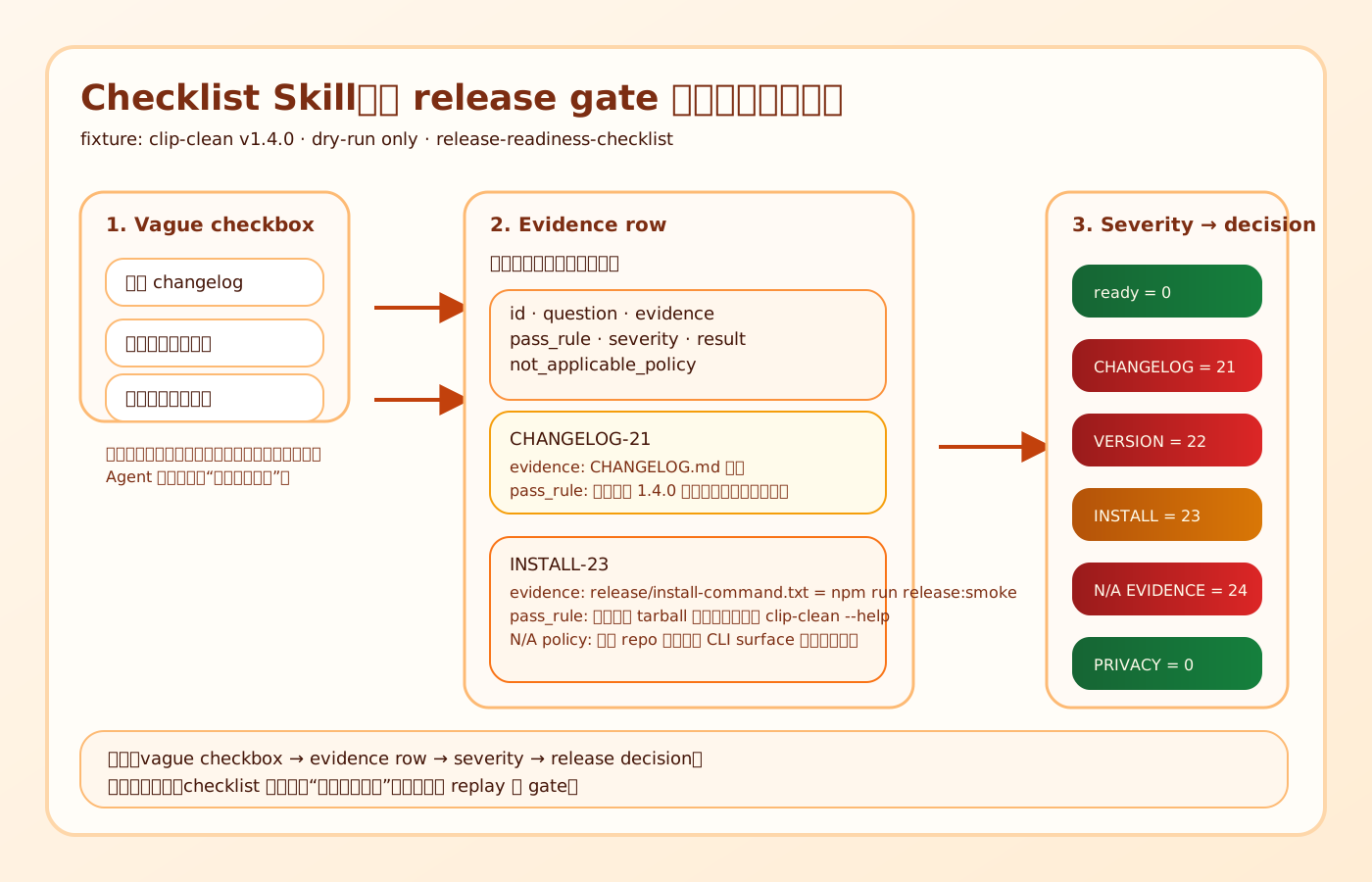 Caption: Only when a checklist row includes evidence, a pass rule, severity, and an N/A policy can it upgrade from “looking like an inspection” to a genuinely replayable release gate. The
 0 / 21 / 22 / 23 / 24 in the diagram are fixed LearnPrompt exit codes used by this article’s Showcase, not npm official terminology.
| Field | Purpose | Why it cannot be omitted |
|---|---|---|
id | Align the article, report, exit code, and outer gate | Without a stable ID, it is hard to write “why this row failed” into automation |
question | State exactly what is being inspected | Otherwise a reviewer cannot even see this row’s object clearly |
evidence | Point to files, commands, and actual output | Without evidence, it cannot be replayed or distinguish “not checked” from “checked but failed” |
pass_rule | Write “passing” as a decidable statement | Avoid empty terms such as “complete,” “reasonable,” or “no problem” |
severity | Mark the issue as blocker, major, or minor | Without severity, an outer process cannot decide whether to continue |
not_applicable_policy | Restrict when N/A can be used | Otherwise the model can most easily mark the hardest row as N/A to escape it |
result | The final conclusion: pass / fail / not_applicable | Without a result, there are only observations, not a gate |
These fields are not mandated by Agent Skills, OpenAI, or npm; they are LearnPrompt’s operational design. What official documentation can establish is:
- A Skill directory can contain
scripts/,references/, andassets/, which makes it suitable for moving deterministic gates down into scripts. - Codex discovers repository Skills from
.agents/skillsand can invoke them explicitly as$skill. - npm’s
pack --dry-runcan be used for a pre-publish dry run. - The
binfield inpackage.jsondetermines the CLI entry point.
What combines these into a “release checklist row contract” is this article’s own design, and it should not be presented as an industry standard.
Severity, N/A policy, and fixed exit codes are the backbone of a release gate
Section titled “Severity, N/A policy, and fixed exit codes are the backbone of a release gate”If a row contract stops at the field level, it is still not enough. The crucial question for a release gate is: how does failure land mechanically?
This article freezes four categories of failures into fixed exit codes:
| Exit code | Meaning | Corresponding row |
|---|---|---|
0 | ready | All frozen rows pass |
21 | missing changelog | CHANGELOG-21 |
22 | version mismatch | VERSION-22 |
23 | unverifiable install command | INSTALL-23 |
24 | N/A without evidence | The validator rejects the report itself |
These five numbers are not an npm official standard either. They let local replay, review, and a documented control plane consume results consistently:
- An outer process can look only at the exit code and know whether the issue is “missing content,” “version drift,” or an unverifiable installation path.
- Reports and exit codes share the same row ID, so a later review does not need to translate the finding again.
N/Ais elevated into24because it is more dangerous thanfail. Afailat least leaves blocking evidence; casually writingN/Amakes the entire checklist unauditable.
The N/A policy must be strict. The rule in this article is: not_applicable is allowed only when the repository proves that the surface does not exist at all. For example, only when a package has no CLI entry point can you mark “installation command smoke” as N/A, and the evidence must explicitly state which bin field you inspected and why you concluded it does not exist. Marking the changelog or install row as N/A for something that is clearly an npm CLI release candidate is directly bypassing the gate.
Showcase: release-readiness-checklist inspects a small npm CLI release candidate
Section titled “Showcase: release-readiness-checklist inspects a small npm CLI release candidate”This article’s Showcase is fixed as release-readiness-checklist. Its target is a fabricated public fixture, clip-clean v1.4.0. It is a very small npm CLI with only bin/clip-clean.mjs; it compresses repeated blank lines in a Markdown snippet into single blank lines. That makes it suitable for demonstrating a release gate without actually publishing to the registry.
The full directory is research/articles/checklist-skill-design/showcase/release-readiness-checklist/. Its three most important layers are:
fixture/: a temporary Git repository template containing.agents/skills/release-readiness-checklist/scripts/:create-temp-repo.mjs,release-gate.mjs,verify-showcase.mjs,run-codex-live.mjs,validate-report.mjs, andprivacy-scan.mjscontracts/: the explicit$release-readiness-checklistprompt and final JSON schema
What this Skill actually does
Section titled “What this Skill actually does”The release-readiness-checklist Skill in the fixture repository does not “publish for you.” It performs only dry-run checks:
- Read
references/checklist-contract.mdto freeze the row shape and exit codes. - Run
collect-evidence.mjsto produce:reports/release-readiness.jsonreports/release-readiness.md
- Run
npm testagain. - Compress the final result back into the JSON schema supplied by the caller.
There are two key boundaries here:
npm publishis forbidden.- Even if one row fails, the Skill must preserve the structured report rather than crash at the first exception.
This is the largest difference between a checklist Skill and an ordinary “take a look”: its output is not a comment but a report with an exit code.
Why the install row must be a separate gate
Section titled “Why the install row must be a separate gate”Many people take the easy way out and write installation checks as “just run npm pack --dry-run.” That is not enough.
npm’s official documentation says that npm pack --dry-run means “make no changes, only report what it would have done.” It is suitable as pre-publish evidence, but it can prove only the packaging layer, not that the install/smoke path described in the README actually closes the loop.
For a release candidate that has not yet been published, a command like the following looks reasonable but cannot be verified before publishing:
npx clip-clean@1.4.0 --helpThe problem is not syntax but a prerequisite: this requires clip-clean@1.4.0 to already exist in the registry. Before an actual release, you cannot confirm its success from the local repository alone. Therefore, this article defines the pass condition for INSTALL-23 as:
- The installation command must be replayable locally.
- Without publishing, it must package the tarball, install it in a temporary directory, and complete a
clip-clean --helpsmoke test. - If the command depends on a registry publish, return
23directly.
In the ready scenario, the fixture uses the local smoke command npm run release:smoke. It first runs npm pack --json to obtain the tarball, then installs that tarball into a system temporary directory, and finally runs the installed CLI’s help command. This changes the inspection target from “I think this install command should work” to “I have verified this path with a local tarball.”
Actual results on 2026-07-12
Section titled “Actual results on 2026-07-12”Offline deterministic replay already covers five frozen scenarios:
| Scenario | Exit code | Description |
|---|---|---|
ready | 0 | Pack, changelog, version, and install smoke all pass |
missing-changelog | 21 | After deleting CHANGELOG.md, CHANGELOG-21 fails |
version-mismatch | 22 | After changing package.json.version to 1.4.1, VERSION-22 fails |
unverifiable-install | 23 | Rejected after changing the install command to npx clip-clean@1.4.0 --help |
na-without-evidence | 24 | The validator rejects a forced not_applicable report with no inspected evidence |
The privacy scan also returns 0: deliverables contain no runtime ID, absolute temporary path, user-directory path, or shell absolute path.
A real Codex invocation: host blocked first, then successful outer rerun
Section titled “A real Codex invocation: host blocked first, then successful outer rerun”The writer’s first attempt in an isolated temporary Git repository was blocked by the host’s in-process app-server permission. We preserve this failure evidence rather than rewriting it as a success:
exec_exit_code: 1blocker_reason: Reading additional input from stdin... |Error: failed to initialize in-process app-server client: Operation not permitted (os error 1)tests_exit_code: 0reports_written: json=false, markdown=falseThe outer orchestrator subsequently reran the same frozen fixture, prompt, schema, and gpt-5.5 without changing the task’s terms. The second real invocation completed with:
skill_invocation: $release-readiness-checklistexec_exit_code: 0release_exit_code: 0tests: passed 2/2reports_written: json=true, markdown=truechanged_files: ?? reports/Codex performed no publication action and did not change the version, changelog, or installation command; it generated only reports/release-readiness.json and reports/release-readiness.md. Therefore, this success cannot erase the first host block, but it completes the key loop this article set out to verify: an explicit Skill invocation can indeed produce reports according to the row contract, and fixture tests can verify them.
An independent read-only reviewer then checked the body text, frozen artifacts, and rendered diagram row by row, and gave PASS 97/100 with zero blocker, major, or minor issues. The article was therefore elevated to showcase_status: verified.
When a checklist Skill should not become a release gate
Section titled “When a checklist Skill should not become a release gate”Not every checklist deserves this structure. The following situations are better left to human review or ordinary prompts:
- The conclusion depends heavily on human taste and has no stable pass rule, such as whether copy has an adequate style.
- You do not yet know which rows are genuine blockers. First conduct several rounds of human review, then freeze severity.
- The evidence you need is unavailable, such as evidence requiring production credentials, an external private service, or an audit system that has not been opened.
- Your team has not yet worked out the difference between
failandN/A. Forcing a gate now will only turnN/Ainto an escape hatch.
In other words, checklist Skills suit problems that are recurring, evidenced, and rejectable; they are not a wrapper for every ambiguous judgment.
Exercise: turn your own release checklist into a row contract
Section titled “Exercise: turn your own release checklist into a row contract”Choose a pre-release checklist you have reused often recently. Do not add items first; instead, take these four steps:
- Pick 3 to 5 items that genuinely block release.
- Add
evidence,pass_rule,severity, andnot_applicable_policyto each row. - Assign fixed exit codes to at least two of the rows.
- Design a negative case that proves your validator rejects “N/A without evidence.”
Observable completion criteria:
- Your report no longer contains only natural-language conclusions.
- Every failure can return to a specific row.
- An outer script can look only at the exit code and know whether to continue the release, add a changelog, or stop and revalidate the install path.
Sources and further reading
Section titled “Sources and further reading”- Agent Skills Specification (primary specification;
SKILL.mdstructure, optional directories, and progressive disclosure) - Build skills | ChatGPT Learn (official OpenAI documentation; Codex’s
.agents/skillsdiscovery path, explicit$skill, and implicitdescriptionmatching) - Customization | ChatGPT Learn (official OpenAI documentation; repository Skills for repeatable workflows and progressive loading of metadata,
SKILL.md, references, and scripts) - Extend Claude with skills | Claude Code Docs (official Anthropic documentation; explicit invocation,
disable-model-invocation: true, and high-risk action boundaries) - Agent Skills overview | Claude Platform Docs (official Anthropic documentation; layered loading of metadata, instructions, and resources)
- npm pack (official npm documentation; dry-run semantics of
pack --dry-run) - package.json (official npm documentation; the
binfield and CLI entry points) - Agent Skills Orange Book (Chinese thematic map / secondary source)
- The task-provided local read-only Orange Book mirror and Chinese transcription (read-only reference, not public distributable material)
The facts in this article about Skill directories, explicit invocation, progressive disclosure, npm pack --dry-run, and bin rely only on official documentation and the locally replayable Showcase from 2026-07-12. The Orange Book serves only as a Chinese thematic map: its README has no standard open-source license, so this article retains only the author, link, purpose, and limitation statement, and copies no PDF text, screenshots, images, or extended passages. The checklist row contract, severity policy, and 0 / 21 / 22 / 23 / 24 exit codes in this article are LearnPrompt’s operational design and are not presented as official terminology.