
CLAUDE.md Template: Minimum Viable Project Rules
| Difficulty | Reading time | Last verified | Author |
|---|---|---|---|
| Beginner | 11 minutes | 2026-07-11 | LearnPrompt Editorial Team |
You have already had Claude Code complete one small change: it read several files, changed one point, ran checks, and gave you a git diff. But when the next new session starts, familiar problems return.
- It guesses another command that does not exist.
- It touches a path you never wanted it to touch.
- At the end it merely says “completed,” without explaining which files changed or what verification ran.
At this point, making the conversation longer usually does not help. What is missing is not a prompt that “speaks better,” but a sufficiently short project-rule file read every round.
The value of
CLAUDE.mdis not recording a vision; it is compressing scattered project facts into context the next round can execute directly.
What you will be able to do after reading
Section titled “What you will be able to do after reading”You will leave with three things you can use immediately:
- Five categories of information for deciding what your first
CLAUDE.mdshould and should not contain. - A little-over-20-line minimal template that you can directly adapt for your project.
- A comparison table that avoids mixing
CLAUDE.md,CLAUDE.local.md,.claude/rules, auto memory, andAGENTS.mdinto one layer.
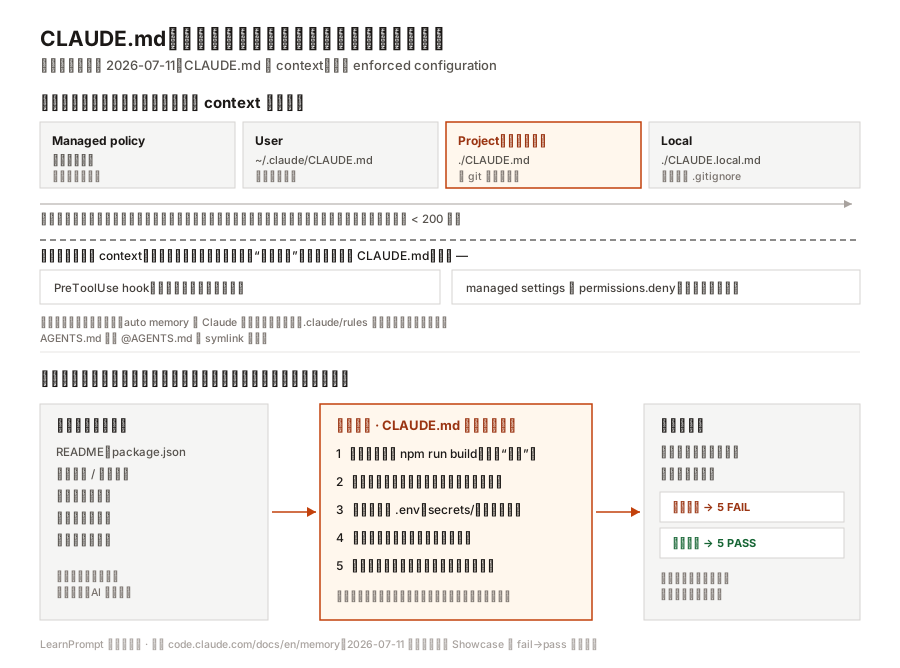 Caption: The upper half explains that all four loading scopes enter a session as context rather than overriding one another. The lower half shows that what is worth writing into a first
 CLAUDE.md is information that compresses project facts into five mechanically checkable rule categories.
Do not write a long document first; locate where repeated failures occur
Section titled “Do not write a long document first; locate where repeated failures occur”A minimal CLAUDE.md does not grow from an empty template. It is distilled from failures you have already seen twice.
If you have completed one small Claude Code task, the most common repeated failures usually fall into only five categories:
| Failure symptom | What is not actually missing | What is actually missing |
|---|---|---|
| Guesses the wrong build or test command | “Please be more careful” | The project’s real commands |
| Makes unrelated changes while working | “Stay focused” | Allowed modification scope |
Touches .env, generated directories, or deployment configuration | “Operate cautiously” | Forbidden paths |
| Does not know how to prove completion after changing code | “Ensure quality” | Fastest acceptance command |
| Ends with only “completed” | “Explain clearly” | Output closing format |
These five categories are not an official industry standard. They are this article’s editorial synthesis of official best practices, memory documentation, and one real small-project loop. Their only benefit is that every category can be mechanically checked for completeness and specificity.
If your project has no fixed commands or boundaries and is only a one-off experiment, you can even refrain from writing one now. The best time for CLAUDE.md is after you have seen a particular error recur for the second time.
Your first CLAUDE.md needs only five kinds of essential information
Section titled “Your first CLAUDE.md needs only five kinds of essential information”The following five types are enough to support “do not repeat the same mistake next round.”
1. Real commands
Section titled “1. Real commands”Do not write “run tests” or “check the build.” Write commands that really exist in the project.
Bad version:
- Run tests after making changesGood version:
## Commands- Install: `npm install`- Build: `npm run build`- Test: `npm run check`Commands must come from project facts such as package.json, Makefile, the scripts directory, or README. When unsure, have the Agent read these files first instead of inventing a command that merely looks reasonable in the rules.
2. Allowed modification scope
Section titled “2. Allowed modification scope”Many irrelevant changes are not because the model is “too proactive,” but because it does not know where the task boundary lies.
The minimal version is not drawing a complete architecture diagram, but stating directly:
## Before Editing- State which files you plan to change first.- Modify only files listed in the plan.- Keep diffs small and reviewable.This rule addresses scope drift, not code-style governance. Long-lived style rules, directory conventions, and complex architecture boundaries belong in more granular .claude/rules or adjacent style articles; do not turn the first file into an engineering encyclopedia.
3. Forbidden areas
Section titled “3. Forbidden areas”Forbidden areas must name real paths, or they are only atmospheric reminders.
## Do Not Edit- Do not modify or commit `.env` or `.env.local`.- Do not edit generated files in `dist/`.- Do not touch deployment configuration under `.github/workflows/` unless the task is deployment itself.The key is making both paths and actions concrete. “Do not touch sensitive files” is not enough; “do not modify .env” has execution value.
4. Fastest acceptance
Section titled “4. Fastest acceptance”The point at which an Agent most easily submits something that “looks roughly right” is not the change itself, but not knowing what completion means.
Therefore write:
## Verify- After behavior changes, first run the fastest check: `npm run check`.- If the command fails, stop and explain the error before changing more files.This rule matters because it turns “complete” from a subjective feeling into observable pass/fail. Official best practices also explicitly stress giving Claude a check that can yield pass or fail, allowing the loop to close itself.
5. Output closing
Section titled “5. Output closing”Without a closing format, every round makes you ask:
- Which files changed?
- What commands ran?
- What were the results?
- What risk remains?
So write it directly as the default delivery:
## Output- At the end, report files changed, verification commands run, and their results.- State remaining risks or unresolved uncertainties.This is not for politeness. It lets you review more quickly, continue the next round, or decide whether to roll back.
A 26-line minimal template is already enough
Section titled “A 26-line minimal template is already enough”The template below comes from this article’s Showcase minimal fixture. It is not universal truth, but it meets all five essential categories and a static checker can judge it 5/5 PASS.
# Project Rules
A small tool that converts Markdown to HTML. The following rules prevent repeated pitfalls in every change.
## Before Editing- Read `README.md` and `package.json` before starting.- State which files you plan to change; modify only those files and keep diffs small and reviewable.
## Commands- Install: `npm install`- Build: `npm run build`- Test: `npm run check`
## Do Not Edit- Do not modify or commit any value in `.env` or `.env.local`.- Do not edit generated files in `dist/`.- Do not touch deployment configuration under `.github/workflows/` unless the task is deployment itself.
## Verify- After behavior changes, first run the fastest check: `npm run check`.- If the command fails, stop and explain the error; do not keep changing more files.
## Output- At the end, report files changed, verification commands run, and their results.- State remaining risks or unresolved uncertainties.
It deliberately does not include long-term code style, hooks, Skills, MCP, or statements such as “we value quality, collaboration, and elegance.” This is not because those are never important, but because they are not the repeated failures a first file needs to solve first.
Do not confuse these five things again
Section titled “Do not confuse these five things again”Many people think “I wrote rules; why did they not take effect?” The root cause is not a broken tool, but mixing different layers into one.
| Name | Role | Suitable contents | What it should not be mistaken for |
|---|---|---|---|
CLAUDE.md | Team-shared project rules | Real commands, allowed scope, forbidden areas, acceptance, output | A hard permission switch |
CLAUDE.local.md | Project-private, local personal preferences | Additional constraints you do not want committed | Team-shared rules |
.claude/rules | Large-project rules split by path | Rules loaded only when particular directories/files match | A replacement for the first minimal file |
| auto memory | Project learning notes Claude writes itself | Experience distilled from interactions | Long-term rules you write |
AGENTS.md | A common entry point for other Agent workflows | Content that can be reused through @AGENTS.md import | A rule file Claude Code reads automatically by default |
Two facts that are easiest to get wrong deserve separate mention:
- Claude Code reads
CLAUDE.mdby default, notAGENTS.md. If a repository already hasAGENTS.md, reuse it through@AGENTS.mdor a symlink rather than assuming it takes effect automatically. - The official memory documentation currently says import recursion has a “maximum depth of four hops.” This writing task card once supplied a claim of “five hops,” but a live check of official text on 2026-07-11 still found four; this discrepancy and its evidence remain in both article and research pack.
Why it is context, not enforcement
Section titled “Why it is context, not enforcement”This is the most important layer for understanding CLAUDE.md.
Official documentation explicitly says Claude treats these files as context, not enforced configuration. That means:
- Writing “do not push” does not mean the client will never allow a push.
- Writing “do not read secrets” does not mean the tool layer has locked the path.
- Writing “run tests first” does not mean it follows the instruction one hundred percent every time.
Its actual function is putting project facts most likely to be missed next round into context at session start, making the model more likely to work from them.
If you need “absolutely never happens,” that is not the document’s responsibility but the execution layer’s. For example:
- Use a PreToolUse block in a hook.
- Deny particular tools or paths in client settings.
- Use CI, lint, schema, or tests for deterministic rejection.
Making this boundary clear is more important than adding thirty more soft rules. Once you treat context as enforcement, you expect the wrong thing and entrust high-risk actions to a Markdown file.
Showcase: in the same checker, vague notes get 5 FAIL and the minimal file gets 5 PASS
Section titled “Showcase: in the same checker, vague notes get 5 FAIL and the minimal file gets 5 PASS”This Showcase does not rank models or present static checking as a “model-following experiment.” It does only two things.
First, it puts these two files through the same field-completeness checker:
vague-notes/CLAUDE.md: abstract slogans only, without the five essential categories.minimal/CLAUDE.md: real commands, allowed scope, forbidden areas, fastest acceptance, and output closing.
The actual commands are:
cd research/articles/minimum-claude-md/showcase/claude-md-fieldsnode check-claude-md.mjs vague-notes/CLAUDE.mdnode check-claude-md.mjs minimal/CLAUDE.mdThe archived 2026-07-11 results are:
RUN 1: vague-notes/CLAUDE.mdFAIL  real commandsFAIL  allowed modification scopeFAIL  forbidden areasFAIL  fastest acceptanceFAIL  output closingexit=1
RUN 2: minimal/CLAUDE.mdPASS  real commandsPASS  allowed modification scopePASS  forbidden areasPASS  fastest acceptancePASS  output closingexit=0
This does not show whether a model follows instructions; it shows whether you wrote the minimum necessary information into the file, and wrote it specifically enough.
Second, it adds one controlled real read-only session to confirm that CLAUDE.md really loads into context. Under read-only conditions, this controlled check asks the model to answer the test command and forbidden path, and to output verbatim a canary token that exists only in CLAUDE.md. In this controlled fixture, all three kinds of information exist only in that file, and archived output hits all three, making strong evidence that this session read the file. The research pack also preserves the exact command, exit-code capture, and fixture structure. It remains only one online run, cannot be extrapolated to long-term adherence, and cannot rank models.
When not to keep adding to this file
Section titled “When not to keep adding to this file”A minimal CLAUDE.md most easily breaks not by being too short, but by continuously receiving things that do not belong there.
Five common anti-patterns are:
- Writing value slogans as rules, such as “stay elegant” or “value engineering culture.”
- Writing a one-off task as a long-term rule, such as “make the home-page CTA blue this week.”
- Putting long-term code style and all architecture detail into one file.
- Believing that writing something in it means an action is hard-prohibited.
- Treating it as auto memory and expecting the tool to write every new lesson back automatically.
A steadier maintenance approach is: after every real failure, add only one rule that can change next-round behavior. If deleting a rule would not noticeably increase mistakes, it probably should no longer occupy context.
Hands-on exercise
Section titled “Hands-on exercise”Take a recently completed small task and write a first version within 15 minutes following these steps:
- Open the
README,package.json, scripts, or build files actually read in that task. - Record only five categories: real commands, allowed scope, forbidden areas, fastest acceptance, and output closing.
- Keep total length to 20–40 lines at first; do not proactively expand into style governance and long-term conventions.
- Answer in one sentence which real failure every rule solves.
- Check again: is any sentence still an abstract slogan, or does it actually belong to a hook, permission,
.claude/rules, or auto memory?
Observable completion criteria:
- The file contains at least one real command and one real path.
- You can identify which failure each rule prevents.
- You can explain which actions still cannot be hard-blocked by this file.
Sources and further reading
Section titled “Sources and further reading”- Official primary source: Anthropic Claude Code Memory
- Official primary source: Anthropic Claude Code Best practices
- Official primary source: Anthropic Claude Code Features overview
- Original empirical material: This article’s research and Showcase directory
- Secondary thematic map (used only for topic selection and Chinese terminology, not as evidence of current product behavior): claude-code-orange-book
Official documentation supports the current facts in this article concerning loading scopes, file distinctions, four-hop import depth, the 200-line recommendation, and the context boundary. The Orange Book is retained only as a Chinese thematic map with attribution and its CC BY-NC-SA 4.0 license notice; this article’s reasoning, examples, and Showcase have been reorganized and checked against official material.