
Hermes Agent's Learning Loop: Memory, Skills, and Write Approval
| Difficulty | Reading time | Last verified | Author |
|---|---|---|---|
| Intermediate | 16 minutes | 2026-07-12 | LearnPrompt Editorial Team |
You use Hermes Agent continuously to modify a project. On the first day, you correct it: “This repository must run the Starlight build before a release.” The next day, it really remembers. A few days later, after an API 503, it “learns” that a service is always unreliable, or saves a token-shaped string from a log as long-term context. The former saves time; the latter can contaminate the next session and even widen security risk.
So Hermes’s “learning loop” should not be written as anthropomorphic marketing. A more precise description is this: it has several observable persistence and maintenance mechanisms that write candidate facts or candidate procedures from a conversation into bounded storage layers; you can enable write approval so those changes first become pending and are then approved or rejected by a person.
This article covers only this line: built-in memory, Skills, background self-improvement review, write approval, Curator, and the boundary with external memory providers. As of 2026-07-12, the latest official release is v0.18.2, while this article’s local read-only probe is Hermes Agent v0.17.0 (2026.6.19). Command availability must therefore be considered by version; local help output is not an eternal fact.
What you will be able to do
Section titled “What you will be able to do”You will gain four judgments:
- When you see Hermes “learn something,” know whether it may have changed memory, a Skill, or another maintenance path.
- Decide whether a candidate lesson belongs in
MEMORY.md/USER.md, in a Skill, or should be rejected outright. - Enable
memory.write_approvalandskills.write_approval, then review pending writes with slash commands. - Explain why background review, Curator, and external memory providers are not “training model weights.”
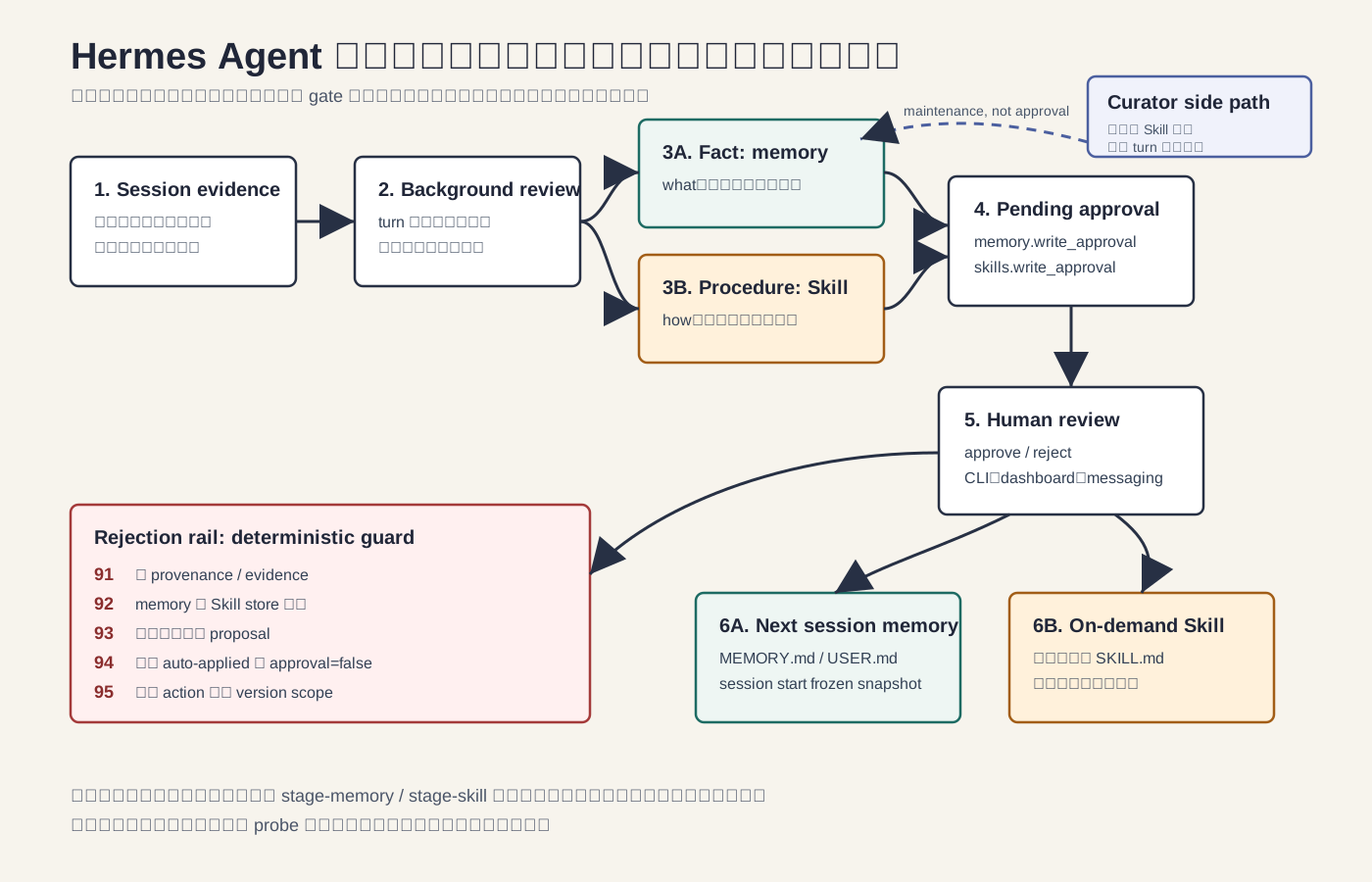 Caption: The key to the learning loop is not “remember everything automatically,” but routing, excluding, approving candidate lessons, and then affecting the next session or an on-demand Skill.
First, break “learning” into observable mechanisms
Section titled “First, break “learning” into observable mechanisms”Hermes’s learning loop contains at least six inspectable stages:
| Stage | Observable object | What it tells you |
|---|---|---|
| Session evidence | User corrections, tool results, error and success paths | The source of a candidate lesson |
| background self-improvement review | May propose a memory or Skill write after a turn | This is review and compression, not model training |
| built-in memory | MEMORY.md / USER.md | Small, stable facts injected at the next session start |
| Skills | SKILL.md and supporting files | Longer multi-step procedures loaded on demand when relevant |
| write approval | pending memory / pending skill writes | A human reviews before a write takes effect |
| Curator | skill maintenance commands and lifecycle | A periodic housekeeping path, not every-turn review |
These mechanisms can make an Agent appear more continuous over long-term use, but their nature differs. Collapsing them into “it self-evolves” hides two engineering questions: what happens when it learns incorrectly, and what content should never be learned.
Built-in memory: bounded, curated, cross-session
Section titled “Built-in memory: bounded, curated, cross-session”Official memory documentation describes Hermes’s built-in memory as two files: MEMORY.md and USER.md. As of 2026-07-12, the current official documentation lists these default limits:
| Store | Purpose | Current official default limit |
|---|---|---|
MEMORY.md | The Agent’s environment facts, project conventions, and learned work habits | 2200 chars |
USER.md | User preferences, communication style, and expectations | 1375 chars |
These values are version facts, not product promises. Official documentation may continue to change; a local or team configuration may also override the defaults.
More importantly, consider injection timing: built-in memory is injected into the system prompt as a frozen snapshot at session start. A write during a session persists immediately to disk, but does not change the current prompt prefix; it enters the initial context visible to the model only when the next session begins. This protects the prompt cache, and also means you cannot expect memory written moments ago to change reasoning in the current turn.
Content suitable for memory is short, stable, and reusable:
| Candidate content | Destination | Reason |
|---|---|---|
| “The user prefers concise Chinese and needs concrete commands.” | USER.md | A stable preference that affects every task |
“This repository’s documentation site is in starlight/; its build command is npm --prefix starlight run build.” | MEMORY.md | A project environment fact |
| “One request returned 503.” | Do not write | A transient error that should not be fossilized |
| “A token-shaped string appeared in a log.” | Do not write | Sensitive or credential-like content must not enter long-term context |
“Today, a /tmp/... path was used temporarily for this article.” | Do not write | A one-off runtime detail |
Memory is neither a session transcript nor an error-log store. Putting an entire conversation, a single failure, a guess, a credential, or a key path into it makes every new session carry noise and risk.
Skill: preserve “how,” not always-on memory
Section titled “Skill: preserve “how,” not always-on memory”Hermes’s tips documentation offers a useful boundary: memory stores “what”; Skills store “how.”
If a lesson is “how the user likes answers,” “what this project is,” or “which convention a tool has in which version,” it is more like a fact. Facts should be short and belong in built-in memory.
If a lesson is “a release takes seven steps; here are the commands for each, how to roll back failures, and which files must be checked,” it is more like a procedure. A procedure should not live in every prompt; it should be a Skill, loaded on demand when the task is relevant. This has two advantages: long processes do not crowd every turn’s context, and the process itself can be expressed more completely with SKILL.md, scripts, and supporting files.
A reusable procedure candidate often looks like this:
When publishing a LearnPrompt article:1. Freeze brief and research pack.2. Run the article-specific showcase validator.3. Run the single article validator.4. Run the Starlight build.5. Run git diff --check.6. Keep writer phase partial until external review passes.This is not suitable for compressing into one memory entry. It contains order, checks, boundaries, and exception handling; it should enter a Skill, and when write approval is enabled it should first be staged as pending.
Background review: it may propose a write; it does not train weights
Section titled “Background review: it may propose a write; it does not train weights”Both the official memory and Skills documentation mention a background self-improvement review after a turn. It may save memory from the just-finished session, or create, modify, or stage a Skill. Three boundaries must be clear:
- It does not train model weights. Changes in later behavior come from persistent context and on-demand Skills, not retraining the underlying model.
- It does not guarantee correct learning on every turn. The official wording is may; a review may write nothing or may misjudge.
- It is not a reason to skip evidence. A candidate lesson still needs a source, version scope, target store, and rejection criteria.
The safest mental model is therefore: background review is a “candidate lesson generator,” not a “truth writer.” When a task is high-risk, the environment has stringent security requirements, or you are debugging a faulty procedure, make it enter pending first.
Enable write approval: turn writes into pending items
Section titled “Enable write approval: turn writes into pending items”Official documentation provides separate write-approval switches for memory and Skills. A minimal configuration example is:
memory:  write_approval: true
skills:  write_approval: true
This example shows only the key fields. For the real configuration-file location, complete fields, and defaults, consult documentation for your Hermes version; do not treat a tutorial fragment as a complete configuration.
After enabling memory.write_approval: true, memory writes wait for review. Officially listed review commands include:
/memory pending/memory approve <id>/memory reject <id>After enabling skills.write_approval: true, write operations including Skill create / edit / patch / delete / write_file / remove_file are staged. Officially listed review commands include:
/skills pending/skills diff <id>/skills approve <id>/skills reject <id>The review surfaces are not identical. Memory entries are short, and CLI foreground writes can usually be inspected inline; messaging, scripts, and background review are better suited to /memory pending. A Skill diff can be long, and messaging chat bubbles may truncate it or only suit a gist; inspect the complete diff in the CLI, dashboard, or pending JSON. The point is not merely to click one more confirmation, but to leave a human gate for content that affects future sessions.
What to inspect during approval: a routing table
Section titled “What to inspect during approval: a routing table”When reviewing a pending write, do not ask only “does it sound right?” Judge in this order:
| Question | When it passes | When it fails |
|---|---|---|
| Is there an evidence path? | Continue judging | Reject and request provenance |
| Is it a stable fact or a procedure? | Route facts to memory and procedures to Skill | Reject or request a rewrite if it is in the wrong layer |
| Does it contain a secret, token, private key, or account identifier? | Continue judging | Reject; rotate credentials when necessary |
| Was it observed only once? | If it still has long-term value, state version scope | Mark needs-more-evidence |
| Does it claim to take effect automatically? | Staged items must require approval | Reject a proposal that bypasses approval |
| Is the version scope clear? | Acceptable | Reject a conclusion with no version scope |
This is also the contract for this article’s Showcase: five action types—stage-memory, stage-skill, reject-transient, reject-sensitive, and needs-more-evidence. Every staged item must have requires_human_approval: true, plus evidence paths, a target store, a reason, and version scope.
Showcase: learning-write-approval-gate
Section titled “Showcase: learning-write-approval-gate”The Showcase directory is:
research/articles/hermes-learning-loop/showcase/It does not read real Hermes memory, skills, config, status, profile, or session databases. Its input is a wholly synthetic session-lessons.json containing at least six candidates:
- A stable user preference.
- A stable project environment fact.
- A reusable publishing procedure.
- A one-off 503.
- A secret-shaped token.
- Tool behavior seen only once, with insufficient evidence.
The local no-model probe ran only safe read-only commands:
hermes --versionhermes skills --helphermes curator --helphermes memory --helpThe research pack retains only a redacted summary: the local version is Hermes Agent v0.17.0 (2026.6.19); the capabilities of the skills, curator, and memory subcommands come from the help output of this installed version. Local paths, project paths, and runtime-environment details from raw output did not enter public artifacts.
You can reproduce the deterministic matrix, privacy gate, and fresh-model proposal like this:
node research/articles/hermes-learning-loop/showcase/scripts/verify-showcase.mjsnode research/articles/hermes-learning-loop/showcase/scripts/privacy-scan.mjsCODEX_NESTED_MODEL=gpt-5.5 node research/articles/hermes-learning-loop/showcase/scripts/run-codex-live.mjsActual verification summary for 2026-07-12:
valid: expected 0, actual 0missing-provenance: expected 91, actual 91wrong-store: expected 92, actual 92sensitive-proposal: expected 93, actual 93approval-bypass: expected 94, actual 94missing-version-scope: expected 95, actual 95privacy: expected 0, actual 0Failure codes covered by the validator:
| Exit code | Meaning |
|---|---|
| 91 | Missing provenance / evidence, or a changed candidate hash |
| 92 | Memory / Skill store is assigned incorrectly |
| 93 | Sensitive content enters a proposal, or a privacy pattern leaks |
| 94 | Claims auto-applied, or a staged item’s requires_human_approval is not true |
| 95 | Unknown action, missing version scope, or mismatched action count |
The fresh gpt-5.5 proposal run does not start a Hermes session or read a real ~/.hermes. In the Showcase directory, it reads only synthetic fixtures, the contract, and the redacted no-model probe; it writes only reports/learning-proposals.json and .md. The outer gate records exec 0, the existence of two reports, validator 0, and unchanged protected files; all six candidate classes are routed by the contract, and the sensitive candidate cites only its candidate ID rather than copying credential-shaped text. The model’s completion message is still not acceptance evidence; final passage comes from an independent validator and privacy scan.
Curator: side-path maintenance, not every-turn review
Section titled “Curator: side-path maintenance, not every-turn review”Curator is often mistakenly described as synonymous with “self-improvement after every conversation.” It is not.
Background review is a path that may propose memory / Skill writes after a turn; Curator is another, periodic skill-maintenance path for skill lifecycle, archiving, restoring, backup, and rollback. It concerns maintenance of the skill library, rather than directly compressing the latest conversation into memory.
There is also a version boundary to handle. This article’s local hermes curator --help comes from Hermes Agent v0.17.0. It says Curator is an auxiliary-model background task that periodically reviews agent-created skills, and lists subcommands including status, run, pause, resume, pin, unpin, restore, list-archived, archive, prune, backup, and rollback; the same help output says bundled and hub-installed skills are never touched. Current online official Curator documentation is newer as of 2026-07-12: hub-installed skills remain off-limits; bundled built-ins have finer version semantics and may be archived when configuration permits, but will not be patched, consolidated, or deleted, and protected built-ins have hard protection.
So a tutorial must not summarize this as “Curator tidies every Skill.” A more reliable formulation is: check hermes curator --help and current official documentation for your Hermes version; do not confuse Curator with every-turn background review; do not assume it can modify hub skills; and check the version and configuration for the boundary around bundled built-ins.
External memory providers: extensions, not replacements for built-in memory
Section titled “External memory providers: extensions, not replacements for built-in memory”In local v0.17.0, hermes memory --help displays setup, status, off, and reset, and says the external memory provider is an optional extension while built-in memory (MEMORY.md / USER.md) is always active. Online official memory documentation likewise describes external providers as deeper persistent memory beyond built-in memory.
Therefore, do not treat an external provider as a replacement. Built-in memory remains the small, critical fact layer injected at session start; an external provider may offer deeper retrieval, modeling, or semantic capabilities, but it must not become an excuse to pour everything into it.
Do not hard-code the number of providers either. The provider lists in online official documentation and local v0.17.0 help are not fully identical, which demonstrates why “there are currently N providers” should not be a core fact unless you state both verification date and version.
Failure modes and debugging order
Section titled “Failure modes and debugging order”If you suspect Hermes learned incorrectly, do not delete databases or reinstall first. Investigate from the smallest to the broadest impact:
- First confirm which session has the symptom: the current session not seeing newly written memory may simply be normal frozen-snapshot behavior.
- Check pending: if approval is enabled, run
/memory pendingand/skills pendingfirst to see whether the incorrect lesson has not taken effect yet. - Check whether the target layer is wrong: facts should not be Skills, and procedures should not be stuffed into memory.
- Check evidence and version scope: a single 503, one slow tool run, or a temporary path should not become a long-term rule.
- Check privacy and credentials: any token-shaped or key-shaped value, account identifier, or private path should be rejected from a proposal.
- Only then inspect Curator: include Curator in diagnosis only when the issue concerns skill lifecycle, archiving, restoration, backup, or rollback.
- Finally check versions: the local CLI, dashboard, messaging surface, and online documentation may not be perfectly synchronized.
One common misconception is: “I already approved memory; why has the current turn not changed?” The usual answer is the session-start frozen snapshot. Another is: “The Skill pending item lacks a full diff; does that mean there is no diff?” The usual answer is that the messaging surface is unsuitable for long diffs; use the CLI, dashboard, or pending JSON.
When not to use this learning loop
Section titled “When not to use this learning loop”Do not let candidate lessons enter a long-term layer in these cases:
- The task itself is one-off research and its conclusion is unstable.
- You are handling secrets, credentials, customer data, or production accounts.
- You observed only one failure and cannot rule out network, rate, permission, or environment causes.
- Humans are still frequently rewriting the process; turning it into a Skill would spread incorrect steps.
- The team has not agreed who may approve content that affects all future sessions.
- You only want to find a past conversation, rather than keep a fact resident in the prompt. In that case, session search or ordinary logs are more appropriate.
The learning loop becomes valuable in repeated work: stable preferences, stable environment facts, verified multi-step procedures, and fixed conventions corrected repeatedly. It is not suitable for storing all history.
A copyable review prompt
Section titled “A copyable review prompt”You can use the following as a human review template for pending memory / Skill writes:
Review only this Hermes learning proposal; do not add facts.
1. Are its evidence paths sufficient to support the conclusion?2. Is it what or how? Only what may enter memory; how should enter a Skill.3. Does it contain a secret-shaped value, account id, private path, or session/request/thread id?4. Is it only a one-off error, one 503, a guess, or a temporary path?5. Does a staged item have requires_human_approval: true?6. Does version_scope state the documentation date, Hermes version, or repository state?
Output: approve / reject / needs-more-evidence, with one sentence of reason.
If you need to write configuration, first verify the complete configuration location and fields against your Hermes version, then change only the approval-related fields. Do not paste .env, tokens, or real pending JSON into a tutorial, issue, or chat.
Exercise: review a batch of candidate lessons
Section titled “Exercise: review a batch of candidate lessons”Practice with the synthetic fixture from this article’s Showcase:
node research/articles/hermes-learning-loop/showcase/scripts/classify-lessons.mjsnode research/articles/hermes-learning-loop/showcase/scripts/validate-learning-proposals.mjsCompletion criteria:
- You can explain why stable user preferences and project environment facts enter
stage-memory. - You can explain why a publishing procedure enters
stage-skill. - You can explain why a one-off 503 is
reject-transient. - You can point out why a secret-shaped token must be
reject-sensitive. - You can explain why one-off tool behavior is
needs-more-evidence. - You can say which kind of error each failure code from 91–95 protects against.
Sources and further reading
Section titled “Sources and further reading”- Hermes official documentation: Persistent Memory: built-in memory,
MEMORY.md/USER.md, default char limits, frozen snapshot, write approval, background review, and external providers. Verified: 2026-07-12. - Hermes official documentation: Skills System: the purpose of Skills, background review may propose skill changes,
skills.write_approval, and/skills pending|diff|approve|reject. Verified: 2026-07-12. - Hermes official documentation: Curator: Curator’s periodic skill maintenance, archiving, restore, backup/rollback, and version boundaries. Verified: 2026-07-12.
- Hermes official documentation: Tips & Best Practices: the “what/how” boundary between memory and Skills, context files, and frozen-snapshot reminders. Verified: 2026-07-12.
- NousResearch/hermes-agent GitHub repository: the official open-source repository. Verified: 2026-07-12.
- NousResearch/hermes-agent Releases: official v0.18.2 release, published 2026-07-08; later than the local v0.17.0 probe. Verified: 2026-07-12.
- Hermes Agent Orange Book: a secondary Chinese topical map by Huashu (alchaincyf). Its README says 2.0 is based on Hermes v0.16.0 and changed from the older CC BY-NC-SA 4.0 to the MIT License in the repository’s
LICENSE; this article does not copy its PDFs, screenshots, charts, or images, and product facts follow official documentation plus the local v0.17.0 no-model probe.
The teaching graphic /images/articles/hermes-learning-loop/hermes-learning-approval-loop.svg is original work by the LearnPrompt Editorial Team, redrawn from this article’s research pack and Showcase contract, and licensed CC BY-NC-SA 4.0.