
How to Write Your First SKILL.md: Make Agents Trigger, Execute, and Verify Reliably
| Difficulty | Reading time | Last verified | Author |
|---|---|---|---|
| Beginner | 12 minutes | 2026-07-11 | LearnPrompt Editorial Team |
You organized a frequently used prompt into a SKILL.md and wrote it with care, yet the Agent acts as if it never saw it,
still forcing the task through with a normal prompt; or the reverse happens: it gets pulled into nearly every task, even butting into unrelated conversations.
When writing a Skill for the first time, what usually blocks you is not writing ability, but three engineering problems: the trigger is wrong, the fields violate hard constraints, and the content is not layered by loading level.
The value of a Skill is not making a prompt longer; it is turning a stable process into a capability that an Agent can recognize, invoke, and verify.
What you will be able to do after reading this
Section titled “What you will be able to do after reading this”- Decide whether a process should become a Skill at all.
- Explain a Skill’s three levels of progressive disclosure: when each level loads, how much context it occupies, and what triggers it.
- Write a minimal
SKILL.mdthat passes official validation, and package it as a.skill. - Remember the official hard boundaries for
nameanddescription, so you avoid violations on the first try. - Recognize which problems can never be solved by “adding another paragraph to the prompt.”
Think it through first: should this process become a Skill?
Section titled “Think it through first: should this process become a Skill?”Do not turn every prompt into a Skill. It is worth writing one only when most of the following apply:
- You have already repeated this process more than three times.
- The input differs each time, but the steps are roughly the same.
- It needs to read files, directories, or web pages in a fixed format.
- It has clear completion criteria.
- Other people may reuse this process too.
Conversely, for one-off temporary tasks, requirements still under exploration, or work with no stable steps that depends heavily on human judgment, a normal prompt is more cost-effective; turning it into a Skill only adds maintenance overhead.
Mechanism: Skills load in three levels, and triggering looks at metadata first
Section titled “Mechanism: Skills load in three levels, and triggering looks at metadata first”To understand why triggering can fail, you first need to know that Skill content is not all placed into context at once; it loads on demand in three levels.
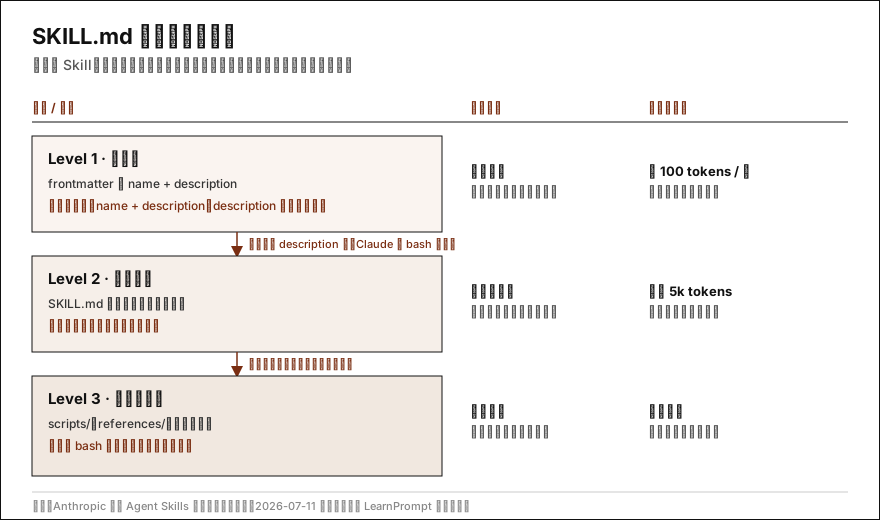 Caption:
 name and description always enter the system prompt; officially, whether a request matches the description is the condition for reading the body, while only script output enters context during execution.
According to the official documentation, the three levels are:
| Level | Content | When it loads | Context cost |
|---|---|---|---|
| Level 1 metadata | name + description | Always loaded at startup | About 100 tokens / Skill |
| Level 2 body | The workflow and steps in SKILL.md | Loaded after it is triggered | Under 5k tokens |
| Level 3 resources | scripts/, references/, templates | On demand; scripts run via bash | Effectively unlimited; code does not enter context |
The key implication: when an Agent decides whether to use a Skill, it first sees the Level 1 name and description, because the body has not loaded at that moment. Officially, whether a request matches a Skill’s description is also the condition for reading its body. Therefore, description is the primary matching basis and must clearly state “what it does + when to use it”; however good the body is, it cannot rescue vague discovery metadata.
Triggers have hard boundaries; they are not free text
Section titled “Triggers have hard boundaries; they are not free text”name and description are triggers, but you cannot write them arbitrarily. According to the official Agent Skills documentation, the fields have explicit constraints:
name: at most 64 characters; only lowercase letters, digits, and hyphens; no XML tags; cannot include the reserved wordsanthropicorclaude.description: non-empty; at most 1024 characters; no XML tags.
These are not style suggestions, but rules that the machine will block before packaging. The Showcase in this article uses the official validation script to hit each of these walls itself.
Minimal structure
Section titled “Minimal structure”A SKILL.md that can trigger and execute reliably must answer at least four questions. Turn them into sections:
---name: link-to-obsidiandescription: One sentence explaining what it does + when to use it (this is the primary matching basis)---
# Skill Name
## When to useDescribe trigger scenarios in terms of tasks, not technical preferences.
## InputsList what the user must provide; ask first when inputs are missing instead of forcing it.
## WorkflowList 5-9 steps in order.
## VerificationList how to determine completion; it must be checkable.
## SafetyList what must not be done, especially when accounts, keys, publishing, or deletion are involved.
name and description make up the discovery metadata, with description taking the primary matching role; Inputs are prerequisites, Workflow is the execution path,
Verification is the acceptance standard, and Safety is the boundary. When these five things each have their proper place, a Skill will not turn into a long but vague prompt.
Layer the directory according to the three loading levels
Section titled “Layer the directory according to the three loading levels”Since the body is recommended to stay within a few hundred lines, and scripts and resources load on demand while code does not enter context, you should not put long scripts into the SKILL.md body.
In Claude Code, Skills belong in ~/.claude/skills/ (personal) or .claude/skills/ (project); this layering is recommended:
my-skill/ SKILL.md # Keep only the core workflow and decisions here scripts/ # Operations that need determinism, run via bash and consume only output references/ # Long reference material, read only when needed assets/ # Files used for output, such as templates and examplesThis operationalizes the official “progressive disclosure” principle: move stable, deterministic parts down into scripts and leave only decisions in the body.
Showcase: create, validate, and package a minimal Skill yourself
Section titled “Showcase: create, validate, and package a minimal Skill yourself”The Showcase below does not present an abstract template; it walks you through the closed loop of “write → validate → package.”
See the complete reproducible record at research/articles/first-skill-md/showcase/minimal-skill.
Inputs and environment
Section titled “Inputs and environment”- One valid minimal Skill directory,
link-to-obsidian/, with a 34-line body. - Three counterexample directories, each triggering one rejected pattern.
- The validation and packaging scripts come from
skill-creatorin the officialanthropics/skillsrepository (LICENSE.txtin its directory is Apache License 2.0; commit9d2f1ae, verified on 2026-07-11). PointSC_ROOTat theskills/skill-creatordirectory.
Execution
Section titled “Execution”# 1. Validate the valid Skillpython3 "$SC_ROOT/scripts/quick_validate.py" link-to-obsidian# 2. Validate counterexamples one by onepython3 "$SC_ROOT/scripts/quick_validate.py" invalid-cases/bad-namepython3 "$SC_ROOT/scripts/quick_validate.py" invalid-cases/extra-keypython3 "$SC_ROOT/scripts/quick_validate.py" invalid-cases/no-desc# 3. Package (automatically validate first, then produce .skill)(cd "$SC_ROOT" && python3 -m scripts.package_skill "$SHOWCASE/link-to-obsidian" "$DIST")# 4. Inspect .skill contentsunzip -l "$DIST/link-to-obsidian.skill"Actual output on 2026-07-11
Section titled “Actual output on 2026-07-11”# Valid SkillSkill is valid! (exit=0)
# name contains spaces and uppercase lettersName 'Link To Obsidian' should be kebab-case (lowercase letters, digits, and hyphens only) (exit=1)
# An unsupported version field is mixed inUnexpected key(s) in SKILL.md frontmatter: version. Allowed properties are: allowed-tools, compatibility, description, license, metadata, name (exit=1)
# Required description is missingMissing 'description' in frontmatter (exit=1)
# Packaging🔍 Validating skill...✅ Skill is valid! Added: link-to-obsidian/SKILL.md✅ Successfully packaged skill to: $DIST/link-to-obsidian.skill (exit=0).skill is simply a zip with an extension; unzip -l shows that it contains only link-to-obsidian/SKILL.md.
What this example proves
Section titled “What this example proves”namemust be kebab-case; uppercase letters and spaces are rejected directly.- The current script accepts a restricted set of fields (allowed-tools, compatibility, description, license, metadata, name); casually adding fields such as
versionis rejected;compatibilityis optional and at most 500 characters. descriptionis required.- Validation is enforced before packaging; if it does not pass, no
.skillis produced.
What it does not prove
Section titled “What it does not prove”- Passing validation guarantees only that the field format is compliant; it does not mean
descriptionwill truly trigger in the right scenarios, nor that the workflow is well written. - The current
quick_validate.pychecks angle brackets, length, and the type/length of optionalcompatibilityindescription, and also uses a kebab-case regex to exclude angle brackets inname; but it does not separately reject the reserved wordsanthropic/claudeinname. Therefore, passing locally still does not mean all semantic constraints in the official documentation are covered. - Trigger accuracy and long-term maintainability must be validated through real use and iteration.
Migrating from a prompt to a Skill
Section titled “Migrating from a prompt to a Skill”If you already have a frequently used prompt, you can split it into fields like this:
| Wording in the original prompt | Where it goes in the Skill |
|---|---|
| “When I give you an article” | When to use (write it as a task, not a technical preference) |
| “You need to know the target audience” | Inputs |
| “First summarize, then rewrite, then provide a title” | Workflow |
| “The output must include a title and body” | Verification |
| “Do not fabricate links” | Safety |
Common anti-patterns and boundaries
Section titled “Common anti-patterns and boundaries”- Writing only principles, not inputs and outputs: after reading it, the Agent still does not know when to trigger or how to execute.
- Describing technical preferences rather than tasks for trigger scenarios (“use when data needs scraping”): the match surface is too broad and pollutes unrelated conversations.
- Writing only “high quality” for acceptance: without checkable items, it is equivalent to having no acceptance.
- Missing safety boundaries: issues easily arise when accounts, keys, publishing, or deletion are involved; the official guidance also emphasizes auditing Skill safety.
- Putting long scripts into the body: it wastes context and is hard to maintain; move them down into
scripts/.
When you should not make a Skill: one-off tasks, requirements still being explored, or no stable steps—normal prompts are enough for these.
Exercise: write and validate your first Skill
Section titled “Exercise: write and validate your first Skill”- Pick a process you do every day with stable steps, such as “save a link as an Obsidian note.”
- Write a
SKILL.md;descriptionmust state both “what it does + when to use it.” - Validate it with the official
quick_validate.pyuntil it outputsSkill is valid!with exit code 0. - Deliberately create a counterexample (an uppercase
name, or one extra field) and confirm that it is rejected with a clear reason. - Package it with
package_skill.py, then useunzip -lto confirm that the.skillcontains yourSKILL.md.
Observable completion criteria: the valid Skill passes validation, at least one counterexample is rejected, and the .skill is produced successfully with correct contents.
Sources and further reading
Section titled “Sources and further reading”- Anthropic official: Agent Skills overview (primary documentation; the authoritative source for field constraints and three-level loading)
- Anthropic official skills repository (including skill-creator) (primary source;
LICENSE.txtin that directory is Apache License 2.0; this article’s Showcase uses the validation and packaging scripts from this commit) - Agent Skills Orange Book (Chinese topic map / secondary source)
The official documentation and official skill-creator support the current product behavior and field constraints in this article; both were re-verified on 2026-07-11. Agent Skills Orange Book serves only as a Chinese topic map: its README states that it is for personal and educational use only and does not adopt a standard open-source license; this article retains only the link and attribution, and does not copy or adapt any of its images or extended passages; the body structure, argument, and Showcase were all reorganized and rechecked by LearnPrompt.