
OpenClaw Architecture Guide: Understand Gateway, Node, and Channel Along One Message
| Difficulty | Reading time | Last verified | Author |
|---|---|---|---|
| Intermediate | 18 minutes | 2026-07-12 | LearnPrompt Editorial Team |
A direct message enters OpenClaw. The Agent needs to read the session, may call a camera on another device, and finally send the result back through the original channel. Which machine should hold the channel token? When a Node disconnects, will messages go directly to it? If you give an operator operator.write, does that mean it has full host permissions?
If you only remember the three labels “Gateway is ingress, Node executes, Channel is a channel,” you still cannot answer these questions. A more reliable approach is to trace one message and ask who holds state, who establishes connections, who authorizes, and who can only declare capabilities. As of 2026-07-12, OpenClaw’s current stable release is v2026.6.11; the official online documentation may keep changing, so this article records both the release boundary and the documentation verification date.
The center of the current architecture is not three peer boxes, but a Gateway-owned control plane: Channel, operator, and Node all connect around it; Node is not a second Gateway, and Channel does not bypass Gateway to reach Node directly.
What you will be able to do
Section titled “What you will be able to do”After reading, you should be able to make five judgments:
- Draw the actual main path:
channel inbound → Gateway → session/agent → node.invoke → Gateway → channel reply. - Explain which state Gateway holds and which state Node explicitly does not hold.
- Distinguish where channel allowlists, DM pairing, device pairing, node capability approval, roles, and scopes take effect.
- Make safe choices among loopback, SSH/Tailscale, and direct non-loopback exposure.
- Use status, RPC probes, and channel probes to distinguish “it is written in the configuration file” from “the runtime path is truly healthy.”
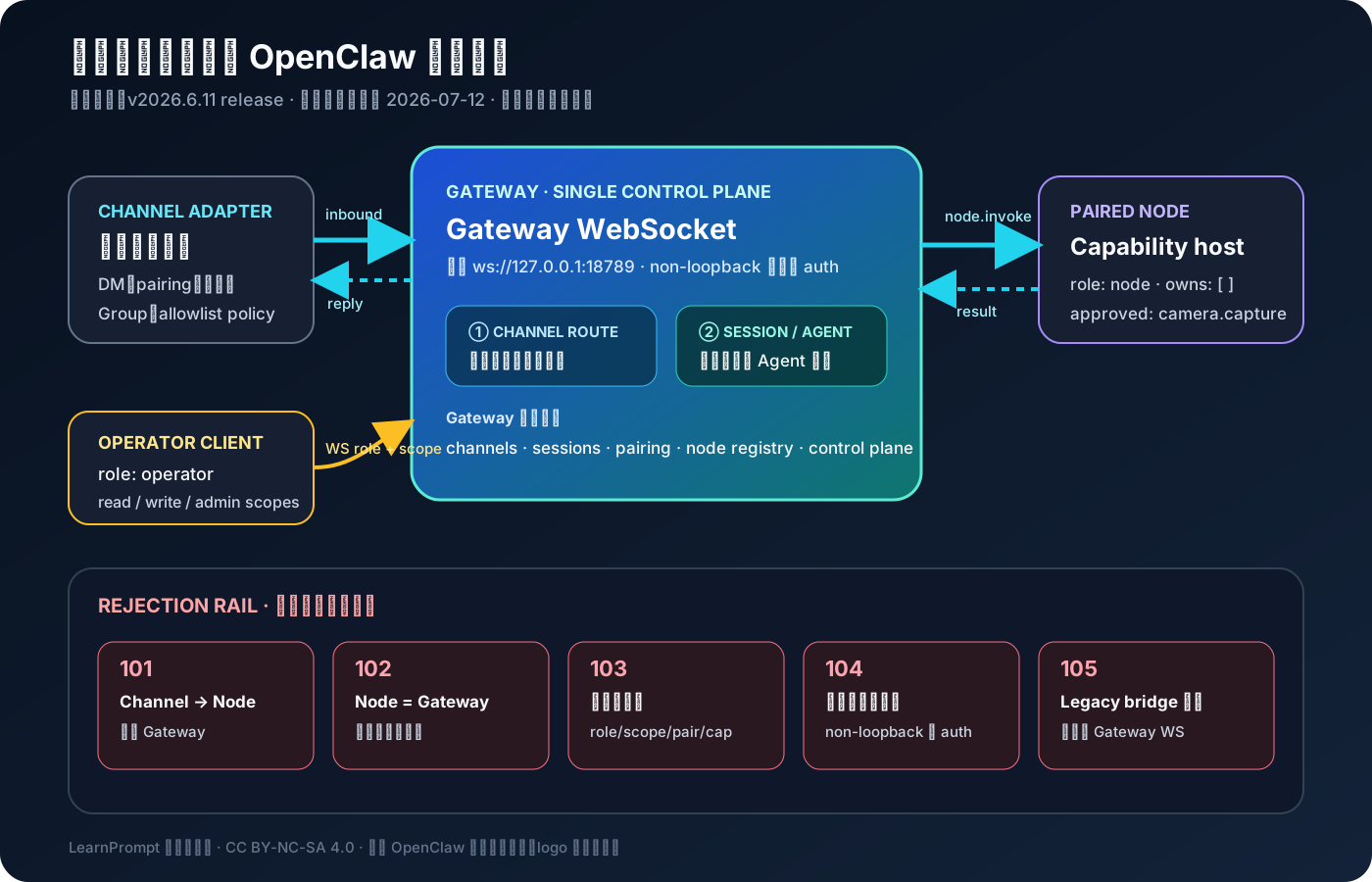 Caption: The upper half follows a synthetic message through the current Gateway WebSocket main path; the rejection track below separates bypassing Gateway, a Node impersonating Gateway, permission overreach, unsafe exposure, and reviving the legacy bridge.
First establish the correct ownership model
Section titled “First establish the correct ownership model”OpenClaw’s Gateway is a single long-running process. Official remote-access documentation explicitly places sessions, auth profiles, channels, and state on the Gateway side; networking documentation explains that it owns channel connections and the WebSocket control plane. Here, “owns” means more than traffic passing through: this is the authoritative source of state and decisions.
| Role | What it actually handles | What it is not |
|---|---|---|
| Gateway | Maintains channel connections, sessions, and state; receives operator/node WS handshakes; performs routing, RPC, pairing, and authorization decisions | Not an ordinary stateless proxy that can be exposed freely to the public internet |
| Channel | A message adapter for Telegram, Slack, and others; hands inbound events to Gateway and receives replies from Gateway | Not a message bus directly connected to a particular Node |
| Operator | A control-plane client such as CLI, Control UI, or automation; calls RPC with role: operator and scopes | Not an inherently trusted administrator of any host |
| Node | A macOS, iOS, Android, or headless capability host; exposes declared and approved command surfaces through node.invoke | Does not run Gateway or own channel/session state |
The official protocol calls Gateway WS OpenClaw’s single control plane and node transport. Both operators and nodes first connect to this WebSocket and declare role and scope in the handshake. Nodes can declare caps, commands, and granular permissions, but these are claims only; Gateway still filters them using server-side allowlists and approved capabilities.
This yields a practical debugging principle: first ask “where is the authoritative state,” then ask “which client disconnected.” If channel configuration exists but Gateway is not running, Node cannot take over the channel; if Node disconnects, Gateway remains authoritative for sessions and channels, but capabilities that depend on that Node are temporarily unavailable.
How exactly does one message travel?
Section titled “How exactly does one message travel?”Take a fully synthetic camera request: an unknown direct message has passed channel pairing, the channel adapter receives “Please take a photo of the lab bench,” Gateway routes it to an existing session, and the Agent decides it needs to call camera.capture on a paired Node.
1. Channel adapter → Gateway: receive inbound event and enforce DM/group policy2. Gateway → session: find or create session and hand it to the Agent3. Agent/Gateway → Node: invoke node.invoke through the current Gateway WS4. Node → Gateway: return the result of an approved capability5. Gateway → Channel: send reply in the original channel contextThere are three places that are easy to draw incorrectly.
First, there is no direct arrow between Channel and Node. The official Gateway runbook also provides a security guarantee: when Gateway is unavailable, a Gateway protocol client fails quickly and does not silently degrade to a direct-channel fallback.
Second, node.invoke is an optional branch, not something every message must pass through. For text-only reasoning, the main path can complete session/agent execution within Gateway and reply directly; a Node capability is needed only when calling a camera, canvas, location, or remote system command.
Third, Node results still return to Gateway, which continues Agent execution and channel replies. Drawing Node as an independent worker is not inherently wrong, but if the diagram gives Node session ownership, channel tokens, or a direct reply path, it has changed the trust boundary.
Do not merge four kinds of gates into one “authorized” status
Section titled “Do not merge four kinds of gates into one “authorized” status”OpenClaw’s gates are distributed across layers. Calling all of them pairing makes configuration review imprecise.
Channel policy: who can send messages
Section titled “Channel policy: who can send messages”Official channel configuration documentation states that the default DM policy is pairing: an unknown sender receives a one-time pairing code and enters only after the owner approves it; the default group policy is an allowlist. A particular channel may be core or installed via an official plugin, and keys and capabilities may evolve, so use the current channel documentation as the source of truth.
This layer answers “can this sender or group enter the system?” It does not answer whether a Node can take a photo, nor does it grant operator RPC.
Device pairing: can this Node connect?
Section titled “Device pairing: can this Node connect?”A Node connects to Gateway WS with role: node. Device pairing determines whether the handshake is accepted, and records live in Gateway’s device state. It answers “can this capability host become a client of the current Gateway?”
Capability approval: what can a connected Node expose?
Section titled “Capability approval: what can a connected Node expose?”Official Node pairing documentation lists this as the second layer: Gateway compares the capability/command surface declared by a Node with the approved surface; new or expanded capabilities first become pending. Before approval, the corresponding Node commands remain filtered. In other words, “Node is paired” does not mean “all capabilities are allowed.”
Role and scope: which control-plane methods can an operator call?
Section titled “Role and scope: which control-plane methods can an operator call?”The general Gateway WS client path discussed here includes the operator and node roles. Common operator scopes include read-only operator.read, operator.write for changes/sending messages/relaying Node commands, and operator.admin for high-risk administrative actions; the Node side can call only node-originated methods. The current protocol documentation also lists a worker role using a separate closed protocol; it does not take the general operator/node path explained in this article, so it is not expanded in this main-path diagram.
These scopes are control-plane guardrails within one trusted Gateway operator domain. Official documentation specifically cautions that they are not hostile multi-tenant isolation. To isolate different people, teams, or machines, use separate Gateways and further separate OS users or hosts, rather than declaring strong isolation after assigning a few more scopes to one Gateway.
How to choose local, remote, and exposure surfaces
Section titled “How to choose local, remote, and exposure surfaces”The default Gateway WebSocket address is ws://127.0.0.1:18789, meaning loopback first. Official networking documentation notes that non-loopback bind refuses to start without a valid Gateway auth path; accepted paths include a token/password or a correctly configured trusted-proxy mode.
| Scenario | Recommended connection | What you still must do | What you must not infer |
|---|---|---|---|
| Operator / Node on the same machine | Default loopback WS | Retain Gateway auth and pairing rules | Loopback does not mean every client automatically has admin |
| Trusted remote device | Tailscale/VPN or SSH tunnel | The client still supplies auth that satisfies Gateway | An SSH tunnel does not bypass Gateway auth |
| Direct LAN/tailnet bind | Valid auth, explicit allowed origins, controlled network | Audit exposure surface and pairing requests | Being able to start does not mean it is suitable for bare public exposure |
| Strongly isolated tenants/teams | Separate Gateway + OS user/host | Separate config, state, workspace, and ports | Operator scopes cannot replace an isolation boundary |
A typical SSH approach forwards a remote Gateway loopback port locally, then points clients at the local port:
ssh -N -L 18789:127.0.0.1:18789 user@gateway-hostClients then still connect to ws://127.0.0.1:18789, but Gateway auth requirements such as token/password remain. The hostname in the example is only a placeholder; do not put real credentials in tutorials, screenshots, or Showcase materials.
Multiple Gateways are not the default answer for horizontal scaling. The official runbook recommends one Gateway per machine for most installations; when isolation or a rescue bot is genuinely needed, each instance must at least have separate ports, config paths, state directories, and workspace roots. Mixing multiple reachable identities makes operators, Nodes, and channels target the wrong control plane, creating state splits that are harder to diagnose than “the process did not start.”
Configuration exists does not mean the path is healthy
Section titled “Configuration exists does not mean the path is healthy”This environment does not have openclaw installed. The commands below are from the official runbook verified on 2026-07-12 and were not run locally. Their value is that they distinguish three levels of evidence.
# Service and basic connectivity stateopenclaw gateway status
# Make successful read-scope RPC a hard requirement, not only reachabilityopenclaw gateway status --require-rpc
# Run per-account channel live probes against a connected Gateway; when unreachable, fall back to a config-only summaryopenclaw channels status --probe
gateway status can report runtime state and a connectivity probe; --require-rpc requires a real read-scope RPC to complete, making it suitable for automated gates. When Gateway is reachable, channels status --probe runs a per-account live probe, but when Gateway is unreachable it shows only a config-only summary. Therefore, seeing channel configuration is insufficient to claim “the channel is healthy”; an acceptance report must say whether the evidence is configuration parsing, Gateway RPC, or a channel live probe.
Similarly, gateway status --deep performs additional scans of system services; it is not a “deeper RPC probe.” Interpreting deep in the command name as end-to-end health leads to the wrong conclusion.
Showcase: make the architecture diagram accept mechanical counterexamples
Section titled “Showcase: make the architecture diagram accept mechanical counterexamples”This article’s gateway-node-channel-route-gate does not read an actual OpenClaw profile or connect to a real Gateway, channel, or Node. It freezes a synthetic topology, a synthetic channel event, operator/node roles and scopes, pairing/capability declarations, and an expected trace. The validator checks whether a report retains the current Gateway WS main path.
Run from the repository root:
node research/articles/openclaw-architecture-guide/showcase/scripts/build-route-audit.mjsnode research/articles/openclaw-architecture-guide/showcase/scripts/verify-showcase.mjsnode research/articles/openclaw-architecture-guide/showcase/scripts/privacy-scan.mjsThe deterministic validation result is valid 0, and it constructs five counterexamples that must fail:
| Exit code | Rejected architecture | Why it must fail |
|---|---|---|
| 101 | Channel bypasses Gateway and sends directly to Node | The current protocol has no direct-channel fallback |
| 102 | Node claims channel/session state or Gateway identity | Node is only a capability host |
| 103 | Role/scope, device pairing, or capability approval exceeds authority | Declaring a capability does not equal server approval |
| 104 | Non-loopback bind has no auth, or remote transport is unsafe | Expanding exposure requires a valid auth path |
| 105 | Treating the removed TCP bridge as current transport, or a trace lacks Gateway WS | The legacy bridge is historical material only |
| 106 | A model writes any file other than two reports in the minimal temporary execution directory | The harness must reject out-of-bounds writes; it is not an OpenClaw product exit code |
This Showcase proves that “this synthetic architecture report conforms to the frozen contract,” not that a real OpenClaw host is deployed correctly. The fresh-model stage runs in a minimal temporary directory outside the repository; it contains only a synthetic fixture, contract, and empty reports. The outer layer diffs complete pre/post file and directory lists and SHA-256 values, allowing exactly two route-audit reports; any other addition, deletion, or change is rejected with 106. Only after that boundary passes are the reports handed to the trace/fixture validator. A model saying “done” cannot replace these gates.
The fresh controlled gpt-5.4 stage on 2026-07-12 hit a Codex usage limit before writing reports; the initial run plus two retries produced no allowed report. The research pack records the model, exit code, report existence, complete changed/unexpected paths, and protected-file result for each of the three attempts. Therefore, this article treats only the deterministic 0/101–106 matrix as completed evidence; the model layer is truthfully marked blocked and cannot be upgraded to “model validation succeeded.”
Complete inputs, scripts, real outputs, and the constrained-run explanation are retained in the research directory. The writer stage remains partial and must not be marked verified before an independent reviewer passes; the reviewer must also decide whether the blocked model layer prevents final publication.
How to investigate five erroneous architectures
Section titled “How to investigate five erroneous architectures”Treating Node as a small Gateway
Section titled “Treating Node as a small Gateway”The symptom is channel connections, a session database, or a “reply directly to the channel” responsibility appearing in Node configuration. The fix is not another synchronization queue: move channel/session ownership back to Gateway, and keep only the approved command surface on Node.
Treating “paired” as all-capability approval
Section titled “Treating “paired” as all-capability approval”Check device pairing and capability approval separately. The former only determines whether Node can handshake; the latter determines which new or expanded commands are visible. Commands also remain subject to normal policy.
Claiming multi-tenant safety with operator scopes
Section titled “Claiming multi-tenant safety with operator scopes”Scopes can limit RPC methods, but one Gateway still operates in one trusted operator domain. For mutually untrusted people, machines, or customer data, split them into separate Gateways, OS users, or hosts, with separate state directories and workspaces.
Opening non-loopback directly while trusting only “the internal network”
Section titled “Opening non-loopback directly while trusting only “the internal network””Inspect bind, auth, allowed origins, and network paths. Being able to connect from another machine is only reachability evidence, not authorization evidence. Prefer Tailscale/VPN or an SSH tunnel; when binding directly, retain valid auth and an explicit exposure surface.
Reviving bridge from an old article
Section titled “Reviving bridge from an old article”The official bridge page is now explicit: the TCP bridge has been removed, and bridge.* configuration keys are no longer in the schema. Current operator/node clients should use the Gateway protocol. The old 18790 port is only a historical troubleshooting clue and must not be drawn into the current main path.
When you should not rely on this architecture diagram alone
Section titled “When you should not rely on this architecture diagram alone”This guide focuses on message routing and trust boundaries. It does not cover model providers, Agent workspaces, sandbox/tool policy, plugin implementation, channel-provider rate limits, or production observability. The following tasks require specialized documentation:
- To open public ingress: read Gateway exposure, authentication, trusted-proxy, and reverse-proxy documentation.
- To run high-risk system commands: continue designing Node command policy, sandboxing, separate hosts, and human approval.
- To provide multi-tenant hosting: do not infer isolation from operator scopes; design according to official multi-tenant-hosting boundaries.
- To determine whether a specific channel is core/plugin or which policies it supports: check its current channel page instead of inferring from this article’s list.
- To verify a real deployment: run real RPC/channel probes and retain redacted evidence from logs and state.
Exercise: audit your own OpenClaw topology
Section titled “Exercise: audit your own OpenClaw topology”Draw a real but redacted message path. Label the transport on every arrow and write one line of “state owned” in every box. Then accept it with this checklist:
gateway: owns: [channels, sessions, pairing, node-registry, control-plane] bind: loopback | tailnet | lan auth_path: token | password | trusted-proxychannel: inbound_policy: pairing | allowlist | open | disabledoperator: role: operator scopes: [operator.read]node: role: node device_paired: true approved_commands: [camera.capture]trace: - channel.inbound -> gateway.channel.adapter - gateway.session.route -> gateway.agent.run - gateway.node.invoke -> node.camera.capture - node.result -> gateway.channel.replyThe completion criterion is not “the diagram looks reasonable,” but: Channel has no direct connection to Node; Node has no channel/session ownership; every remote connection has Gateway WS and an auth path; pairing, capability approval, scope, and channel policy are each marked on the correct layer; and the current diagram contains no legacy bridge.
Sources and further reading
Section titled “Sources and further reading”- OpenClaw official: Network
- OpenClaw official: Gateway runbook
- OpenClaw official: Gateway protocol
- OpenClaw official: Operator scopes
- OpenClaw official: Node pairing
- OpenClaw official: Channel configuration
- OpenClaw official: Nodes
- OpenClaw official: Remote access
- OpenClaw official: Bridge protocol (historical reference)
- OpenClaw v2026.6.11 release
- OpenClaw Orange Book
Official materials support this article’s product behavior as of 2026-07-12; the stable-release boundary is v2026.6.11, published 2026-06-30. OpenClaw Orange Book was compiled by Huashu (alchaincyf); this article treats it only as a secondary Chinese topic map from 2026-04. The repository does not publish a standard LICENSE or CC/OSI license, so this article does not copy or adapt its PDFs, screenshots, charts, images, or paragraphs. This article’s original instructional image is provided by the LearnPrompt Editorial Team under CC BY-NC-SA 4.0.