
Control Style Bloat with CLAUDE.md: Put Rules at the Right Layer Instead of Making Them Longer
| Difficulty | Reading time | Last verified | Author |
|---|---|---|---|
| Intermediate | 16 min | 2026-07-11 | LearnPrompt Editorial Team |
You have already written a minimal CLAUDE.md, with real commands, acceptance commands, and off-limits paths. At first it works well. But after a few rounds of collaboration, the file starts growing new sections:
- “Use design tokens consistently in the UI.”
- “Return a consistent envelope from APIs.”
- “Check file naming before committing.”
- “When multiple directories are involved, think about the impact surface first.”
- “Important: do not write weird classNames again.”
The problem is not that all of these statements are wrong. It is that once they are mixed into one layer, they start competing for attention. Claude Code officially defines CLAUDE.md as context loaded every round, not enforced configuration; once rules become too long, too broad, or too contradictory, the usual result is not greater stability but greater randomness.
This tutorial does not repeat how to write the first minimal file. It addresses the next step: once rules have begun to expand, how do you break one real style failure into three different destinations?
- Root
CLAUDE.md: global conventions that should be known every time. .claude/rules/: local rules that should appear only when working in a certain directory or file type.- Deterministic checks: parts that must pass rigidly and cannot rely on the model to “try its best” to obey.
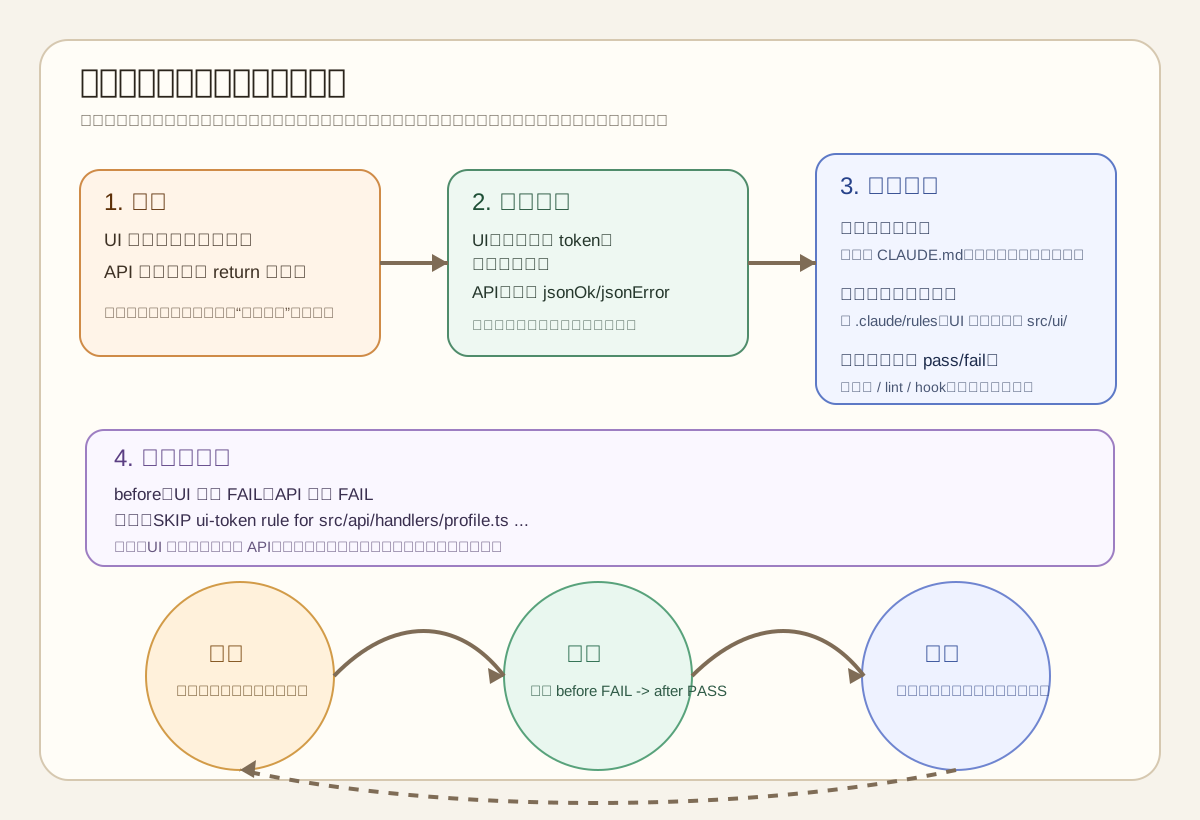 Caption: Read the diagram from left to right. First see how one failure is rewritten as a “specific rule”; then see whether it belongs at the root, in path scope, or in a mechanical check; finally see the maintenance loop: add only rules that change behavior, run checks, then remove stale or duplicate parts.
What You Will Be Able to Do
Section titled “What You Will Be Able to Do”You will take away three reusable decision frameworks:
- A placement decision: when to write a rule in the root
CLAUDE.md, when to split it into.claude/rules/, and when to turn it directly into a script or CI check. - A reproducible Showcase: in the same small UI + API repository, first put style rules at the wrong layer and cause a failure, then split them into root rules, UI-scoped rules, API-scoped rules, and a deterministic script to get
before FAIL -> after PASS. - A maintenance loop: not “keep adding a rule whenever you think of one,” but “add one specific rule -> verify whether it changes behavior -> prune rules that have no value or conflict with each other.”
The non-goals of this article should also be clear up front:
- It does not repeat the five categories of essential information in a minimal
CLAUDE.md; that topic is covered in Your First CLAUDE.md: Derive Minimal Usable Rules from Repeated Failures. - It does not describe
CLAUDE.mdas a hard permission layer. If an action must be blocked, it should be placed in a deterministic execution layer rather than expecting a piece of Markdown never to fail. - It does not expand on Skills, MCP, or broader extension design. It uses only their boundary decisions, without entering implementation details.
Start with a Real Failure: The Rules Are Not Too Few, but at the Wrong Layer
Section titled “Start with a Real Failure: The Rules Are Not Too Few, but at the Wrong Layer”Let us first look at a typical failure.
The project itself has both frontend and backend:
src/ui/contains React components and requires design tokens instead of hard-coded colors.src/api/handlers/contains API handlers and requires a consistentjsonOk/jsonErrorenvelope.
At first, the team piled both types of constraints into the root CLAUDE.md, with statements like these:
## Style- 始终使用设计 token,不要写硬编码颜色。- API 返回统一 envelope,不要直接 return 原始对象。- 修改完成后运行风格检查。This looks “all correct,” but it creates three problems at once.
First, Claude reads every style reminder whenever it enters any directory. It sees UI token rules while changing APIs, and API envelope rules while changing the UI. The official memory documentation puts this plainly: CLAUDE.md is loaded at the start of every round; the more specific it is, the better, while greater length makes adherence easier to reduce. Putting local rules into the global entry point essentially adds irrelevant noise to every session.
Second, the rules mix constraints of different strength. “Do not write hard-coded colors” can still be left to the model’s understanding of code context; but “APIs return a consistent envelope” can often already be mechanically determined by a static script. Writing both as reminder sentences makes you mistakenly think they belong at the same layer.
Third, once the root file grows longer and longer, it becomes difficult to tell which rule truly changed behavior. Official best practices suggest maintaining CLAUDE.md like code and asking of every line: “If I delete this, will Claude become more likely to make mistakes?” If the answer is no, delete it instead of continuing to add words.
So the real problem is not “there are not enough rules,” but “global and local rules are mixed, and soft reminders and hard checks are mixed.”
Three-Layer Placement Decisions: Root Rules, Path-Scoped Rules, Deterministic Checks
Section titled “Three-Layer Placement Decisions: Root Rules, Path-Scoped Rules, Deterministic Checks”Putting style rules at the right layer is not mainly about intuition. Ask three decision questions.
| Decision question | If the answer is “yes” | Where it belongs |
|---|---|---|
| Should this rule be known in every session? | For example, real commands, major directory boundaries, and a consistent delivery format | Root CLAUDE.md |
| Does this rule apply only to a directory, file type, or subsystem? | For example, UI tokens, API envelopes, and test-directory conventions | A path-scoped rule in .claude/rules/ |
| Can this rule be mechanically determined as pass/fail? | For example, forbid hexadecimal colors or require API helpers | A deterministic script, lint, test, or CI |
The three layers are not mutually exclusive; they narrow progressively.
The root CLAUDE.md is responsible for “what to always know.” Official features overview defines it as the place for always know / always do X, suitable for project consensus, commands, directory boundaries, and maintenance practices. It is not suitable for carrying a large number of language details and styles that apply only to one subdirectory.
.claude/rules/ is responsible for “what to know only when.” The official memory documentation explicitly supports paths in the frontmatter of rule files, loading that portion of context only when Claude handles matching files. This is critical for multi-directory projects because it changes noise from “read every round” to “read only upon entering relevant paths.”
Deterministic checks are responsible for “what must truly pass.” As long as a rule can be determined by a script, do not leave it only as a natural-language reminder. Natural-language rules are good for giving the model direction; deterministic checks are what give you a clear pass/fail signal.
You can understand it in a more practical sentence:
- The root file defines the default worldview.
- Scoped rules define the local grammar of subdirectories.
- Mechanical checks define the final judge.
Keep Only What “Should Be Known Every Time” in the Root File
Section titled “Keep Only What “Should Be Known Every Time” in the Root File”First, consider what the root CLAUDE.md should keep.
In this article’s Showcase, the root file retains only four types of content:
# Repo Rules
- 先读 `README.md` 和 `package.json`,确认命令与目录边界。- 根规则只放所有改动都适用的约束;UI 和 API 细则放进 `.claude/rules/`。- 改动完成后运行 `node ../verify-style-scope.mjs <snapshot>`。- 如果某条风格要求已经可以被脚本确定性检查,就不要再把它写成长段解释。
Why prune it this way?
Because this information meets the standard of “should be known every time.” Whether Claude changes frontend or backend, it needs to know:
- Confirm real commands first instead of guessing.
- Local styles do not live in the root file; they live in
.claude/rules/. - What the final verification entry point is.
- Once a rule can be mechanized, it should sink into a script instead of continuing to pile up in context.
This is fundamentally different from “write all style details into the root file.” One strong signal from official best practices is “Keep it concise,” along with the suggestion to judge line by line: will deleting this line lead to more errors? Information such as “UI components use tokens,” which applies only in src/ui/, does not meet the standard of “should be known every time.” Keeping it in the root file only buries genuinely global commands and boundaries.
The easiest mistake here is writing the root file as an “organizational thought report.”
Bad writing commonly looks like this:
- Maintain good style.
- Prioritize consistency.
- Center long-term maintainability.
- Both frontend and backend should follow best practices.
These sentences may not be wrong, but they give no specific landing point and cannot be verified directly. By contrast, “put UI and API details in .claude/rules/, then run node verify-style-scope.mjs” is actionable.
Put Local Styles in .claude/rules/, and Let Scope Speak for Itself
Section titled “Put Local Styles in .claude/rules/, and Let Scope Speak for Itself”The official memory documentation provides a direct mechanism for path-scoped rules: put rule files in .claude/rules/, use paths in YAML frontmatter to specify the matching range, and apply them only when Claude handles those files.
This matters especially for “rule bloat” because it solves loading timing, not merely directory organization.
The UI rule file in this article’s Showcase looks like this:
---paths:  - "src/ui/**/*.tsx"---
# UI Style Rules
- 组件颜色来自 `theme.ts` 的 token,不要写十六进制颜色。- `className` 统一经过 `cx()` 组合,避免在 JSX 里拼接样式字符串。
The API rule file is:
---paths:  - "src/api/**/*.ts"---
# API Contract Rules
- 处理器返回 `jsonOk(...)` 或 `jsonError(...)`。- 不要直接 `return { ... }` 暴露裸对象。
Splitting rules this way brings two benefits.
The first is less irrelevant context. When Claude handles src/api/handlers/profile.ts, it does not need to read “do not write hexadecimal colors” every round; conversely, when handling a UI component, it does not need to carry API envelope implementation details.
The second is that conflicts are easier to find. Official documentation warns that if two rules contradict one another, Claude may choose either one arbitrarily. Once local rules are separated, you will more quickly see whether “this belongs only to the UI, or should actually be upgraded to a global constraint.”
It is especially important to emphasize that a path-scoped rule is not a deterministic test. It only decides more precisely “which context should be read when.” To truly prove pass/fail, you still need the later script.
Showcase: In the Same Small Repository, First FAIL, Then PASS After Splitting Layers
Section titled “Showcase: In the Same Small Repository, First FAIL, Then PASS After Splitting Layers”This article’s Showcase is in research/articles/control-style-with-claude-md/showcase/style-scope/. It is not an online model benchmark, nor proof that “Claude will definitely obey”; it is a rerunnable mechanical experiment that answers a narrower question:
After changing style rules from “piled into the root file” to “root rules + path-scoped rules + deterministic checks,” can we prove more clearly which category of constraint should apply to which category of file?
The Showcase directory contains two snapshots:
fixture/before/: the rules are already layered, but the code remains in a failing state.fixture/after/: under the same rule structure, both UI and API implementations are fixed to pass.
Run commands:
cd research/articles/control-style-with-claude-md/showcase/style-scopenode verify-style-scope.mjs beforenode verify-style-scope.mjs afterThe actual archived results from 2026-07-11 are in result.txt. The most important lines are:
SCENARIO beforePASS root CLAUDE.md keeps only repo-wide instructionsPASS UI rule is path-scoped to src/ui/**/*.tsxPASS API rule is path-scoped to src/api/**/*.tsFAIL src/ui/Button.tsx uses hard-coded color #7c3aedSKIP ui-token rule for src/api/handlers/profile.ts because path does not match src/ui/**/*.tsxFAIL src/api/handlers/profile.ts returns a raw object instead of jsonOk/jsonErrorRESULT FAIL
SCENARIO afterPASS root CLAUDE.md keeps only repo-wide instructionsPASS UI rule is path-scoped to src/ui/**/*.tsxPASS API rule is path-scoped to src/api/**/*.tsPASS src/ui/Button.tsx uses theme tokens and cx()SKIP ui-token rule for src/api/handlers/profile.ts because path does not match src/ui/**/*.tsxPASS src/api/handlers/profile.ts returns jsonOk/jsonError helpersRESULT PASS
This set of results proves three things.
First, UI rules really should not apply to APIs. Notice that the SKIP line is not decoration; it is one of the Showcase’s most important pieces of evidence: the checker explicitly records that the UI rule skipped the API file because its path did not match. In other words, we are not relying on a subjective explanation that “in theory it should not apply”; we put the scope decision into rerunnable output.
Second, static checks prove only mechanical constraints, not model adherence. Whether src/ui/Button.tsx contains a hexadecimal color and whether profile.ts returns jsonOk/jsonError can both be determined reliably by a script. But the script cannot prove why Claude wrote it that way, much less prove that placing rules correctly will always automatically generate correct code.
Third, what truly belongs in the root file is the “layering principle” and the “verification entry point,” not detailed style rules. Otherwise it is hard to see from the results which rule took effect and which was merely background noise.
Write Rules as a Maintenance Loop: Add, Verify, Prune
Section titled “Write Rules as a Maintenance Loop: Add, Verify, Prune”The challenge of rule governance is never writing it the first time. It is whether the rules are still clean after the third, fifth, or tenth time.
One sentence from official best practices is worth putting into practice directly: maintain CLAUDE.md like code. This article expands it into a three-step loop.
1. Add: Add Only One Rule That Can Change Behavior
Section titled “1. Add: Add Only One Rule That Can Change Behavior”Do not add five abstract reminders at once after one failure. First ask:
- In which directory did this failure specifically occur?
- Is it global information, local context, or something that should actually be scripted?
- If this rule is deleted, will the same mistake still recur in the next round?
For example, if a UI component used a hard-coded color, first add one path-scoped UI rule; if it continues to be missed every time later, sink “forbid hexadecimal colors” into a check script. Do not immediately write all historical experience into a long document.
2. Verify: Use Real Output to Decide Whether a Rule Changed Behavior
Section titled “2. Verify: Use Real Output to Decide Whether a Rule Changed Behavior”Verification is not “I feel it is clearer now”; it is checking whether there is a pass signal.
For this article’s scenario, there are two verification signals:
- Scope verification: whether the script explicitly outputs that the UI rule hits only UI files and does not mistakenly affect API files.
- Behavior verification: whether
beforefails andafterpasses, and whether the failure reason corresponds exactly to the rule you just added.
If a new rule neither changes a check result nor reduces later rework, it is probably just noise.
3. Prune: Remove Duplicate, Stale, and Already-Scripted Content
Section titled “3. Prune: Remove Duplicate, Stale, and Already-Scripted Content”Pruning is usually the easiest part to overlook, but it determines whether the root file will bloat again.
The following three types of content are most worth removing:
- Long reminders that can already be determined by scripts.
- Local rules that belong only to one directory but still remain in the root file.
- Old conventions that conflict with the current implementation or are no longer needed.
The official memory documentation also warns of another risk: if rules conflict, Claude may choose one arbitrarily. Pruning is fundamentally conflict control as well. The shorter the root file and the more local rules load by path, the fewer places actually require human review.
When Not to Keep Adding to CLAUDE.md
Section titled “When Not to Keep Adding to CLAUDE.md”“Keep adding rules” is not the default answer. In the following situations, stop and change layers.
Case One: You Need a Hard Failure, Not “Try to Follow It”
Section titled “Case One: You Need a Hard Failure, Not “Try to Follow It””If your real requirement is “APIs must never return raw objects,” and that can be fully determined mechanically, write a checker directly. A natural-language rule can still retain a one-sentence summary, but the judge must become a script.
Case Two: The Rule Belongs Only to One Directory or Language
Section titled “Case Two: The Rule Belongs Only to One Directory or Language”For example: “Markdown document titles use sentence case,” “frontend components use only design tokens,” or “database migration files include timestamps in their names.” None of these belong permanently in the root file. Keeping them at root level only makes every session read information that does not help the current task.
Case Three: You Are Adding a One-Off Task Instruction
Section titled “Case Three: You Are Adding a One-Off Task Instruction”“Switch billing to the new API this week” and “do not touch the login page in this PR” are task instructions, not long-term memory. They should stay in the current chat, issue, or task card, not become project rules read every round.
Case Four: You Can No Longer See the Effect of Each Rule
Section titled “Case Four: You Can No Longer See the Effect of Each Rule”When you cannot answer “what behavior did this rule change?” or “what would happen if I deleted it?”, the file has entered the bloat zone. Prune first, then decide whether to add anything.
Exercise: Split an Existing Style Failure into Three Layers
Section titled “Exercise: Split an Existing Style Failure into Three Layers”Find a failure that has recurred at least twice in the last two weeks, and do a minimal governance pass with the steps below.
- First write down the specific manifestation of the failure, not an abstract value statement. For example, “the component wrote a hard-coded color again,” not “style is inconsistent.”
- Decide whether it should be known in every session. If not, do not put it in the root
CLAUDE.md. - Decide whether it applies only to a directory or file type. If so, design a path-scoped rule.
- Decide whether it can be determined reliably by a script. If so, add a minimal check instead of continuing to add paragraphs to Markdown.
- Record one
before FAIL -> after PASS. If you cannot produce that evidence, do not yet say the rule has been governed successfully.
Completion criteria should also be observable:
- You can identify what one root rule, one local rule, and one deterministic check each solve.
- You can explain why a UI rule should no longer appear in the context of an API change.
- You can delete at least one old rule that was previously in the root file but is now redundant.
Sources and Further Reading
Section titled “Sources and Further Reading”- Official primary sources: How Claude remembers your project, Best practices for Claude Code, and Extend Claude Code.
- Official primary source: Overview. This article uses it to check Claude Code’s product positioning and multi-surface entry points, rather than treating third-party screenshots as current evidence.
- Secondary topical map: Claude Code Orange Book. Its repository README declares CC BY-NC-SA 4.0; this article uses it only as a Chinese topical map, not as a source of current product facts.
Official documentation supports this article’s current behavior claims about the division of responsibilities among CLAUDE.md, .claude/rules/, and the deterministic execution layer. The Orange Book only helps establish the topic and Chinese context; this article’s structure, Showcase, diagram, and conclusions were rebuilt using official materials and locally rerunnable evidence from 2026-07-11.