
Choosing Among Codex's Four Execution Surfaces: CLI, IDE Extension, Desktop App, and Cloud
| Difficulty | Reading time | Last verified | Author |
|---|---|---|---|
| Beginner | 11 minutes | 2026-07-11 | LearnPrompt Editorial Team |
You have installed the Codex CLI, opened the extension in VS Code, and also have a Codex mode in the desktop app. Then a task arrives: should you run it in the terminal, keep it in the editor, or hand it to Cloud? Most people instinctively ask which is “more powerful,” but this is not a model-ranking question. The real questions are what environment the task depends on, what feedback cadence it needs, how much permission it may have, and whether it can be delivered asynchronously.
What you will be able to do after reading
Section titled “What you will be able to do after reading”- Classify a task with four questions instead of first asking which product to use.
- Distinguish the runtime location and delivery model of the CLI, IDE extension, desktop app’s Codex mode, and Cloud from official documentation.
- Use three real task cards to recognize the boundaries of local sandboxes, independent review, and Cloud environment setup; also know which product capabilities were not field-tested here.
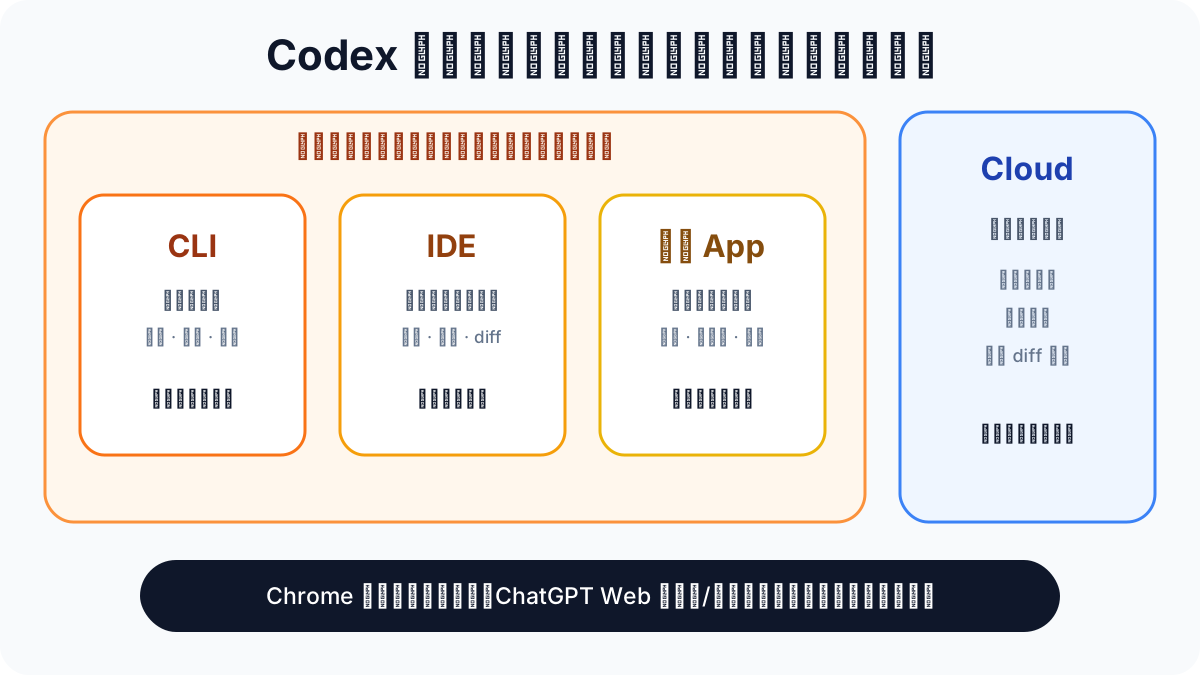 Caption: CLI, IDE, desktop app, and Cloud are not a ranking from weak to strong. Describe a task with four questions first, then route it to the most appropriate execution surface.
First correct a category error
Section titled “First correct a category error”An earlier LearnPrompt version compared “CLI, IDE, Chrome, and desktop” side by side. The problem was not only that it was outdated; it placed execution surfaces and capability plugins on the same layer:
- The Chrome extension still exists. Official documentation describes it as an installable desktop-app plugin: when a task needs a signed-in browser state, call Chrome from ChatGPT Work or Codex; for localhost or public pages that do not need sign-in state, prefer the built-in browser. It has not disappeared, but it also should not be treated as the same kind of execution environment as the CLI or Cloud.
- ChatGPT web is also listed as a separate available entry point. This article does not count it as a fifth runtime environment. Instead, it is an interface for starting and reviewing Cloud work; the task itself runs in a configured remote Cloud environment.
- The IDE extension can edit locally and can hand longer tasks to Cloud. When the desktop app and IDE open the same project, they can also share the current task and editor context.
- There are boundaries on shared local configuration. Official documentation explicitly states only that the Codex agent in the desktop app, the IDE extension, and the CLI inherit the same agent configuration. ChatGPT web Work sessions run in managed environments and do not read local
config.toml. Cloud also requires repository environments to be configured separately.
This article therefore focuses on four execution surfaces commonly used for development tasks: CLI, IDE, the desktop app’s Codex mode, and Cloud. The Chrome extension and ChatGPT web are explained where relevant, but are not forced into one “which is stronger” table.
The four execution surfaces
Section titled “The four execution surfaces”| Execution surface | Runtime location | Typical trigger | Permission and environment boundary |
|---|---|---|---|
| Codex CLI | Local terminal | codex (interactive) or codex exec (non-interactive) | --sandbox (read-only / workspace-write / danger-full-access) + --ask-for-approval |
| Codex IDE extension | A local project beside the editor; can hand work to Cloud | VS Code / Cursor / Windsurf sidebar, with native Xcode and JetBrains integrations | Local agent configuration is shared with the CLI and desktop app; handing off to Cloud switches to a remote environment |
| Desktop app Codex mode | A local project in the standalone macOS / Windows app | Select Codex mode; can combine files, the built-in browser, computer use, or plugins | Common settings are managed in the app UI; advanced agent settings inherit local config.toml; browser websites have their own authorization boundary |
| Codex Cloud | An isolated OpenAI-hosted remote environment | ChatGPT web, CLI, IDE, GitHub, Linear, or Slack | Configure dependencies, tools, environment variables, or secrets for every repository first; then review the summary and diff |
Sources: Codex CLI, Codex IDE extension, ChatGPT desktop app, Developer settings, and Codex cloud, checked on 2026-07-11.
Choose an execution surface with four questions
Section titled “Choose an execution surface with four questions”Do not start by asking for a product name. Take a specific task and answer these in order:
| Question | Leans local (CLI / IDE / desktop) | Leans cloud (Cloud) |
|---|---|---|
| Environment dependency: does it need local files, sign-in state, or uncommitted work? | Yes | No, and the repository’s Cloud environment is already configured |
| Feedback cadence: do you need to watch it as it works? | Yes | You can review it after delivery |
| Permission risk: which files, accounts, or systems could an error affect? | Frequent human confirmation is needed | An isolated environment and final diff review can provide a backstop |
| Asynchronous need: can you leave and inspect the result later? | Not especially | Yes |
When all four answers lean local, choose among the CLI, IDE extension, and desktop app based on whether you need terminal scripting, already have the editor open, or need to operate across apps.
Showcase: three task cards that test the routing rule
Section titled “Showcase: three task cards that test the routing rule”Instead of using a vague example such as “scan a repository,” we ran three task cards locally with codex-cli 0.142.2 (2026-07-11) and saved the commands, output, and failures. They field-test only CLI permission behavior, the isolation risk of a review call, and the prerequisites for Cloud submission. IDE delegation and desktop-app computer use are represented only by official documentation here; they are not presented as field tests.
Card 1: local writing — the real boundary of sandbox permissions
Section titled “Card 1: local writing — the real boundary of sandbox permissions”Task: write a probe file in a repository. It has high environment dependence (a local uncommitted worktree), needs immediate feedback, has medium permission risk, and does not need asynchronous delivery. Routing decision: use the local CLI; probe the boundary with --sandbox read-only first, then use --sandbox workspace-write after confirmation.
codex exec -c model="gpt-5.5" --sandbox read-only \ "Write one line, 'sandbox probe', to .../probe.txt. Do only this."Actual result:
error=patch rejected: writing is blocked by read-only sandbox; rejected by user approval settingsUnable to write. The current environment is a read-only sandbox and approval policy=never, so apply_patch was rejected.The file was not created and no other files were modified.After switching to --sandbox workspace-write, the same task successfully wrote the file, and the diff contained only one new target file. This shows that the local CLI’s sandbox mode can keep the impact radius of an error small—but you must choose and inspect the actual mode explicitly, rather than assuming inherited permission configuration is already safe enough.
Card 2: independent review — a routing decision failed; the command name is not enough
Section titled “Card 2: independent review — a routing decision failed; the command name is not enough”Task: run an independent review on staged code deliberately containing a shell-injection vulnerability. The ideal route would be a new session, a read-only sandbox, frozen input scope, and an asynchronous report. We first ran codex review --uncommitted directly and used the observed result to check that assumption.
git add card-2-independent-review/sample-snippet.pycodex review -c model="gpt-5.5" --uncommitted --title "showcase: sample snippet review"The process exited with code 0 and did read the staged file, but the run record showed two problems: it inherited a danger-full-access sandbox, then explored the entire working directory extensively; the final record also did not form a structured conclusion about the vulnerability. This card is therefore not a “review success,” but a routing failure: a command exiting normally does not mean the review objective was met, and the name review does not automatically grant read-only isolation.
Card 3: an asynchronous Cloud task — a real blocker, not a pretend success
Section titled “Card 3: an asynchronous Cloud task — a real blocker, not a pretend success”Task: submit a task to Codex Cloud and verify whether one that does not depend on the local environment and needs asynchronous delivery can actually route to Cloud. The routing conclusion, in theory: Codex Cloud.
$ codex cloud listNo tasks found.
$ codex cloudError: Device not configured (os error 6)
$ codex cloud exec --env "learnprompt-lane-a" "test task"Error: no cloud environments are available for this workspace
codex cloud list returned an empty task list, but cloud exec found no available environment, so no task was actually submitted. This only shows that the current workspace lacks a Cloud environment; it does not generalize to the account or network. It validates a more specific reminder: before choosing Cloud, connect the repository and configure its dependencies, tools, environment variables, or secrets. Do not treat it as a zero-configuration remote CLI.
What the three cards conclude together
Section titled “What the three cards conclude together”| Observation | Card 1 (local writing) | Card 2 (independent review) | Card 3 (asynchronous Cloud) |
|---|---|---|---|
| Did the routing assumption hold? | Yes: read-only rejected writing; success came only after explicitly allowing it | No: it inherited an overly broad sandbox and scanned beyond the intended scope | The prerequisite rule held, but the task was not submitted because the environment was missing |
| Is a human required to be present? | Yes, to decide when writing permission may be opened | It can be asynchronous, but isolation parameters and report acceptance must be fixed first | Configure the environment first; it is suitable for real asynchronous work only afterward |
| Was the actual result recorded honestly? | Yes | Yes, including the boundary problem | Yes, including the blocker |
The three cards test whether the routing rule exposes risk, not a capability leaderboard for four product surfaces: Card 1 offers a positive permission comparison; Card 2 shows that an “independent review” must be explicitly isolated; Card 3 exposes a Cloud-environment gap before submission. IDE delegation, the desktop app, and the Chrome extension were not field-tested; only official sources are used for them. See the complete record in the research directory.
When not to apply this classification mechanically
Section titled “When not to apply this classification mechanically”- If you have not decided what task success means, write the acceptance criteria before changing execution surfaces.
- If a repository has not configured a Codex Cloud environment but you force asynchronous execution, it will be blocked by setup just as Card 3 was; complete it locally first instead.
- For irreversible actions involving secrets, releases, or deletion, every execution surface requires a human confirmation step. Do not replace specific approval settings with a vague impression that “the cloud is safer.”
Exercise: choose an execution surface for the task in your hands
Section titled “Exercise: choose an execution surface for the task in your hands”Take a real task, answer the four routing questions, then record your choice:
task: what needs to be doneenvironment_dependency: does it depend on local files / sign-in state / uncommitted workfeedback_cadence: must you watch it as it works, or can it be asynchronouspermission_risk: which files / accounts / systems could an error affectasync_need: can you leave and inspect the result laterchosen_surface: CLI / IDE extension / desktop app / Cloudwhy: one sentence explaining the choiceIf you find that chosen_surface says “the one I always use” rather than a result derived from the four items above, you are still choosing by brand rather than by task.
Sources and further reading
Section titled “Sources and further reading”- Official documentation: Codex CLI
- Official documentation: Codex IDE extension
- Official documentation: ChatGPT desktop app
- Official documentation: Developer settings
- Official documentation: Windows desktop app
- Official documentation: Chrome extension
- Official documentation: Codex cloud
- Chinese secondary topic map: Codex Orange Book
The Codex Orange Book uses CC BY-NC-SA 4.0. This article labels it as a Chinese secondary topic map, retains its source and license, and uses it for the initial topic angle. It does not retain the book’s side-by-side CLI / IDE / Chrome / desktop comparison. Instead, based on official documentation checked on 2026-07-11, it separates execution surfaces, access entry points, and capability plugins, then uses three task cards from local codex-cli 0.142.2 to verify the boundaries that can be reproduced in the field.