
Obsidian + Git Workflow: Separate Sync, Backup, Version Control, and Agent Bulk Changes
| Difficulty | Reading time | Last checked | Author |
|---|---|---|---|
| Advanced | 18 minutes | 2026-07-12 | LearnPrompt Editorial Team |
You ask an Agent to update 30 notes in your Obsidian vault in bulk: add links, consolidate terminology, and rewrite project statuses. It finishes quickly, and Obsidian refreshes the files immediately. A few minutes later, iCloud or OneDrive syncs those changes to another device. The next day, you discover that three private notes were changed incorrectly, two Wiki links are broken, and an exported PDF was committed to the repository.
The most dangerous response at this point is to blur every tool together into vague “insurance”:
- “I have sync, so I am not afraid of losing anything.”
- “I have Git, so that is backup.”
- “I can reset, so I will restore first and figure it out later.”
- “The Agent said it finished, so it can be merged.”
This article addresses only one question: How can you separate Obsidian sync, independent backups, Git version control, and acceptance of Agent candidate changes into four boundaries, so bulk note edits first become reviewable candidates instead of directly contaminating the main vault?
This article does not repeat the first four articles’ placement, Markdown handoff, index routing, or maintenance proposals. It assumes you already know “where material belongs,” “which entry point an Agent should read,” and “how maintenance suggestions are queued.” The problem here comes later: once a candidate has actually changed files, how do you inspect the diff, reject scope violations, accept part of it, or discard it safely?
What you will be able to do
Section titled “What you will be able to do”After reading, you should be able to break an Obsidian vault automation into seven checkable actions:
- First confirm that a vault is a local Markdown folder, and that Obsidian Sync, iCloud, OneDrive, and Git each solve only part of the problem.
- Use a clean baseline to leave an explicit starting point before Agent changes.
- Use an isolated branch or worktree so candidate changes do not touch the default branch.
- Write
.gitignoreto keep workspace state, caches, trash, exports, credentials, and large binaries out of version history. - Use
git status/git diff/ link checks / secret gates to decide whether a candidate can enter human review. - When conflicts occur, stop automation first, read the conflict markers, and manually merge the meaning instead of treating destructive recovery as the first response.
- Do not push a private vault to a public remote by default until you have separately decided on remote hosting, access control, encryption, and independent backups.
First separate the four boundaries
Section titled “First separate the four boundaries”Obsidian’s official boundary is simple: a vault is a folder on the local file system, notes are plain-text Markdown files, and Obsidian refreshes when external editors or file managers change files. This lets Git, scripts, and Agents work directly on notes; but it also means that an Agent is not changing simulated state, but real files.
First separate four terms that are often mixed together:
| Layer | What it solves | What it does not solve |
|---|---|---|
| Sync | Lets multiple devices see the same current set of files | Does not prevent bad edits from spreading; is not backup |
| Backup | Keeps an independent, one-way, recoverable copy elsewhere | Does not provide line-by-line diff review; is not real-time collaboration |
| Git | Records snapshots, branches, diffs, commits, and merges | Does not automatically sync across devices; does not replace an independent offsite backup |
| Agent candidate | Produces a set of changes awaiting acceptance | Does not prove semantic correctness; cannot bypass human review and gates |
Obsidian’s backup page states this directly: sync is not backup. Sync aims to keep files consistent between devices; if you delete a batch of notes by mistake, that error can also be propagated consistently. A backup should instead be a recovery copy elsewhere, usually one-way, independent, and offsite, so real-time sync cannot damage it by mistake.
Obsidian’s sync page also places Git among “version control” methods and notes that Git sync does not happen automatically: you need to commit and push, then pull on another device. In other words, Git can explain “what changed in which edit,” but it is neither Obsidian Sync nor an independent backup.
There are also two practical boundaries to put into your rules early:
- If the vault is in iCloud, OneDrive, or Google Drive, first use your system settings to keep vault files available locally. Obsidian officially recommends Keep Downloaded for iCloud and Always keep on this device / Available Offline for OneDrive, so offloading does not make Obsidian think files are missing.
- Do not give the same vault to multiple sync services at once. The official sync page explicitly recommends avoiding combinations such as Obsidian Sync and iCloud to prevent conflicts or corruption.
Git’s tool boundaries: each command answers one question only
Section titled “Git’s tool boundaries: each command answers one question only”Git works well for an Obsidian vault not because notes “look like code,” but because Markdown is ordinary text and Git can compress changes into reviewable diffs. But avoid treating Git commands like incantations. Each command answers only a narrow question:
| Command / mechanism | The question it answers | How to use it in a vault |
|---|---|---|
git status | What differs among the working tree, staging area, HEAD, and untracked files? | Before and after bulk edits, check for a dirty baseline, out-of-scope files, and conflicts |
git diff | Which exact lines changed, and how do the working tree, staging area, commits, and branches differ? | Human-review Agent candidates; constrain the diff budget |
branch | Which line of history does this set of changes belong to? | Separate candidates from the main line |
worktree | Can one repository have another isolated working directory? | Let an Agent edit in a candidate directory while the main directory stays untouched |
commit | How do you freeze the currently accepted snapshot? | Record the candidate or merge result after it passes the gates |
restore | How do you recover path contents from a specified source? | Use only after confirming which uncommitted changes you want to discard |
| merge conflict | Both sides changed the same place, and Git cannot merge automatically | Stop automation, manually read conflict markers, and merge the meaning |
The official description of git status emphasizes that it shows three kinds of differences: index versus HEAD, working tree versus index, and files that Git neither tracks nor ignores. For Obsidian, this answers “was it clean before the Agent,” “what appeared after the Agent,” and “did noise such as .obsidian/workspace.json slip in?”
The official git diff documentation covers comparisons among working trees, indexes, commits, branches, and files. For article writing or knowledge-base maintenance, the diff is the human-review entry point: you should not look only at the Agent’s summary, but at exactly how every piece of note text changed.
The value of git worktree is especially high. It lets one repository have multiple working trees. You can keep the default branch in the main vault and open another candidate worktree for the Agent. When a candidate fails, deleting the candidate worktree and branch is clearer than restoring a pile of confused changes in the main vault.
git restore is not a “run this when you panic” button. The official documentation says that it restores paths from a source; if a tracked path does not exist in that source, it is removed to match the source. That means you must know what you are discarding before you run it, especially by first confirming that no uncommitted human changes exist.
.gitignore: block noise; do not make configuration philosophy for the team
Section titled “.gitignore: block noise; do not make configuration philosophy for the team”Obsidian’s .obsidian directory stores vault-specific settings such as hotkeys, themes, and community plugins. The official documentation also specifically notes that .obsidian/workspace.json and .obsidian/workspaces.json update when you open a new file; if you use Git for a vault, consider adding them to .gitignore.
That does not mean “the entire .obsidian directory can never be committed.” Teams should decide which settings are worth sharing:
- Personal workspace layouts are usually not committed.
- CSS snippets, hotkeys, templates, and some plugin settings used jointly by the team may be worth committing.
- Plugin caches, indexes, and transient state are usually not committed.
- Plugin settings containing tokens, accounts, or private paths must never be committed.
One .gitignore that can serve as a starting point:
# Obsidian workspace state.obsidian/workspace.json.obsidian/workspaces.json
# Cache and local indexes.obsidian/cache/.obsidian/plugins/*/data.json.trash/.DS_StoreThumbs.db
# Exports and generated filesexports/dist/*.pdf*.zip
# Credentials and local secrets.env*.pem*.keycredentials.*secrets.*
# Large binary captures*.mov*.mp4*.psd*.sqlite
The point of this list is to “block obvious noise and dangerous files first,” not to declare the only answer for other .obsidian configuration. You can write this separately in the team README:
We commit shared vault configuration only after review.Workspace layouts, plugin caches, local exports, credentials, and large binaries stay ignored.Before Agent bulk changes: build a candidate area; do not edit the main line directly
Section titled “Before Agent bulk changes: build a candidate area; do not edit the main line directly”A safe Agent bulk note update needs at least these prerequisites:
- Clean baseline:
git status --shorthas no unexplained changes. Otherwise you cannot distinguish Agent edits from uncommitted human work. - Isolated branch/worktree: Candidate changes occur in
candidate/..., while the main line remains unchanged. - Allowed paths: The task contract states exactly which notes, receipts, and reports the Agent may edit.
- Diff budget: Limit added and deleted lines so one “cleanup” does not become a full-vault rewrite.
- Secret and binary gates: Reject tokens, private keys,
.env, large videos, databases, and export bundles. - Link checks: Check both Wiki links and Markdown links; renames must update references at the same time.
- Human review: Only after mechanical gates pass should a person review semantics and writing style.
You can write the task contract in ordinary Markdown:
# Agent note update contract
Allowed write paths:- notes/projects/alpha-plan.md- notes/research/git-boundaries.md- receipts/candidate-receipt.md
Hard gates:- Do not edit the default branch directly.- Do not change paths outside the allowlist.- Do not add secret-shaped text or large binaries.- Keep diff under 120 changed lines.- Do not create broken Wiki or Markdown links.- Write a receipt with changed paths and acceptance status.
This contract does not depend on a model’s self-discipline. The real safety comes from the deterministic gate that follows: it reads Git status, paths, diffs, file sizes, links, and the receipt to decide whether the candidate can enter human review.
A safety rail: accept only passing candidates; discard failures directly
Section titled “A safety rail: accept only passing candidates; discard failures directly”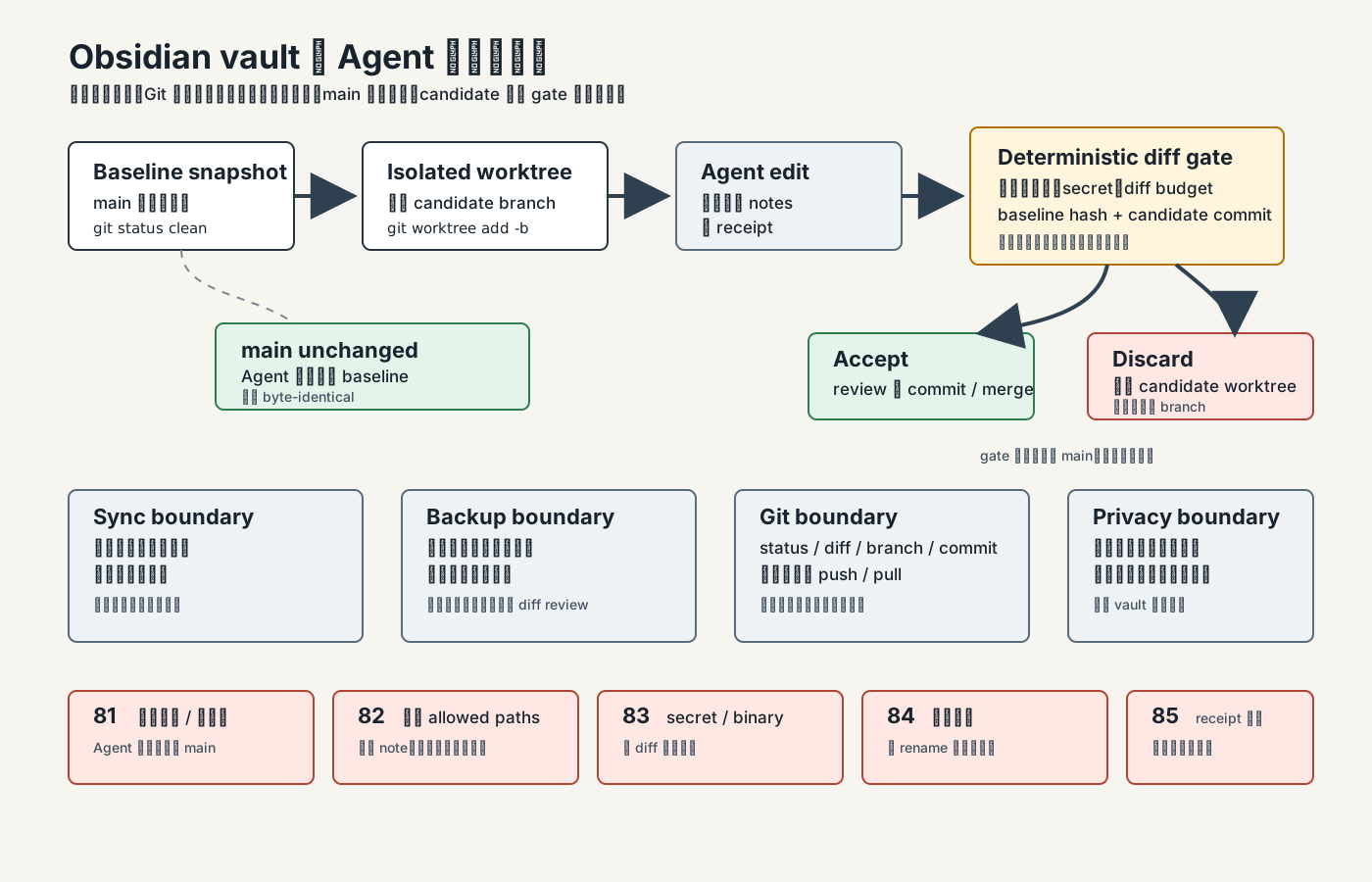 Caption: The key in the diagram is not any one command, but “main stays untouched; candidate is disposable.” Sync propagates current files, backup provides an independent recovery copy, and Git provides diffs and snapshots; an Agent candidate is only worth human review after passing gates 81-85.
In plain language, the process is:
- Confirm a clean baseline on main.
- Create a candidate worktree from the baseline.
- The Agent edits only allowed paths in the candidate worktree and writes a receipt.
- The gate checks differences between the candidate and the baseline.
- If it passes, a human reviews the diff and decides whether to commit/merge.
- If it fails, delete the candidate worktree/branch; main was untouched, so the main vault needs no destructive recovery.
This is why this article prefers worktree. If an Agent edits directly in the main vault, after a failure you must answer “which edits were made by the Agent, which did I just make manually, and which have already been propagated by a sync service?” If an Agent edits in a candidate worktree, failure is just a lifecycle question for one directory and one branch.
Showcase: vault-git-change-gate
Section titled “Showcase: vault-git-change-gate”The Showcase for this article is located at:
research/articles/obsidian-git-workflow/showcase/vault-git-change-gate/It commits a completely synthetic vault:
- 10 Markdown files: 9 synthetic notes plus a task contract.
- One
.gitignorecovering workspace state, caches, trash, exports, credentials, and large binaries. - One sample
.obsidian/workspace.jsonto demonstrate that workspace-layout files exist but should be ignored. - One
TASK_CONTRACT.mddeclaring allowed paths, receipts, and hard gates. - No nested
.git.
At runtime, the script copies the fixture to the system temporary directory, initializes a Git repo there, creates a baseline commit, and then creates the candidate/agent-note-update worktree. It does not run git restore, switch branches, commit, or reset in the LearnPrompt repository itself.
Reproduce the deterministic gate:
node research/articles/obsidian-git-workflow/showcase/vault-git-change-gate/scripts/verify-showcase.mjsnode research/articles/obsidian-git-workflow/showcase/vault-git-change-gate/scripts/privacy-scan.mjsActual results on 2026-07-12:
PASS vault-git-change-gate deterministic verifierfixture markdown notes: 10fixture nested .git: novalid: expected 0, actual 0default-branch-no-isolation: expected 81, actual 81outside-allowed-paths: expected 82, actual 82secret-shaped-change: expected 83, actual 83broken-internal-link: expected 84, actual 84missing-receipt: expected 85, actual 85changed paths: notes/projects/alpha-plan.md, notes/research/git-boundaries.md, receipts/candidate-receipt.mddiff line budget: 17/120baseline main unchanged: yestemporary worktree safe to discard: yesThe privacy scan also passed: committed artifacts in the repository contain no secrets, account identifiers, local user paths, or runtime temporary paths.
The run history for fresh gpt-5.5 retains three layers of results rather than showing only the final success. The first writer-stage attempt was blocked by the host’s read-only state DB before model execution; the first outer retry actually changed the three correct paths, but the receipt did not state link_check: passed and the baseline tree hash precisely, so the gate rejected it with 85. Only the final permitted retry after tightening the receipt contract passed: exec 0, validator 0, edits to only the two specified notes and one receipt, a 13-line diff, and an unchanged main baseline. Failure summaries, the invalid 85 summary, the final patch/receipt, and the success summary are retained separately in results/; a model completion message was not treated as acceptance.
This Showcase demonstrates workflow boundaries, not model capability rankings. Both the deterministic baseline and fresh-model candidate are mechanically checked by the validator:
- default branch / missing isolation =
81 - outside allowed paths =
82 - secret-shaped text, large binary, or oversized diff =
83 - broken internal link / rename not updated =
84 - missing receipt, missing acceptance, or empty changes =
85 - privacy scan =
0
Conflict handling: stop automation first, then read the meaning
Section titled “Conflict handling: stop automation first, then read the meaning”A Git merge conflict is not a bad thing. It is Git telling you that two lines of history changed the same place and it cannot safely guess which side is correct. Pro Git’s basic merging chapter explains that Git pauses the merge, lists the files as unmerged, and inserts conflict markers into the file.
A conflict in an Obsidian vault usually looks like this:
marker: <<<<<<< HEADSync only keeps current files consistent between devices; backup stores a separate recovery copy.marker: =======Sync is backup, so no additional copy is needed.marker: >>>>>>> candidate/agent-note-updateThe correct handling order is:
- Stop the Agent, automated scripts, and sync triggers first so the conflicting file is not changed again.
- Run
git statusto see which files are unmerged. - Open each conflicting file and read the meanings on both sides of
<<<<<<<,=======, and>>>>>>>. - Manually write the correct version and delete the conflict markers.
- Run link checks and any required note validation.
- Use
git addto mark the conflict resolved, then continue the commit or merge.
Do not let a model “just choose ours/theirs.” Note conflicts are often semantic conflicts, not formatting conflicts. In the example above, one side correctly distinguishes sync from backup while the other is a dangerous misconception; automatically choosing either side could leave an incorrect tutorial behind.
Recovery and discarding: do not treat reset --hard as the first response
Section titled “Recovery and discarding: do not treat reset --hard as the first response”If a candidate worktree fails, the cleanest recovery is usually not to restore files, but to discard the candidate:
git worktree remove ../vault-candidategit branch -D candidate/agent-note-updateThe prerequisite is that you have confirmed all Agent edits exist only in the candidate worktree and the main baseline was untouched. This is why isolation has been emphasized repeatedly above.
If you already have uncommitted changes in the main vault, do not rush to run destructive commands. The minimal investigation sequence is:
git status --shortgit diffgit diff --cachedFirst answer three questions:
- Which files changed?
- Which changes have not been staged yet?
- Is any manually written human content mixed in?
git restore <path> can restore a specific path, but it returns that path’s contents to the specified source; if the tracked path is absent in the source, the path may be removed. Teach users to run it only when they know “the uncommitted change to this one path can be discarded.” Do not put git reset --hard in the first step of a tutorial, because it wipes the entire uncommitted state and often destroys the evidence first.
Privacy: remote location, access control, and encryption are separate decisions
Section titled “Privacy: remote location, access control, and encryption are separate decisions”A private vault should not be pushed to a public GitHub repository by default. Git is only version control; the remote is another system, access control and encryption are another decision, and backup is yet another decision.
Before pushing a vault to a remote, answer at least these questions:
| Question | Why it matters |
|---|---|
| Is the remote public, private, organization-internal, or self-hosted? | Determines who can see history and accidental commits |
| Does history already contain a secret or private note? | .gitignore only blocks the future; it cannot automatically clean history |
| Is end-to-end encryption or a local encrypted backup needed? | Private permissions in Git hosting do not equal content encryption |
| Which device is responsible for independent backups? | Sync services have no primary-device concept; backup needs a deliberate policy |
| May the Agent read the entire vault? | Read access itself can expose private content |
If your vault contains diaries, medical, financial, customer, contract, or account information, first separate a public or synthetic subset for automation practice. Do not replace privacy design with “the repository is private anyway.”
When not to use this Git workflow
Section titled “When not to use this Git workflow”If your vault contains only a small number of private fragments and you will not have an Agent or script edit it in bulk, manual backup plus sync may already be sufficient; you do not need Git just for ceremony.
If your main problem is “which directory should new material go in,” first add a placement contract. Git can tell you what changed, but cannot decide a material’s role.
If your main problem is “which entry point should an Agent read,” first add index routing. Git will not reduce the model’s reading scope.
If your main problem is “whether AI should propose maintenance work,” first add a proposal queue. This article covers how to accept a candidate after it has actually changed files.
If you cannot accept any risk of remote exposure, you can use Git locally only for diffs and snapshots, then use an independent encrypted backup for your recovery strategy. A Git remote is not mandatory.
Hands-on exercise: build a change gate for a small vault
Section titled “Hands-on exercise: build a change gate for a small vault”Do not begin with a real private vault. First create 8 to 12 Markdown notes and simulate one batch Agent modification.
- Write
.gitignorethat at minimum ignores.obsidian/workspace.json,.obsidian/workspaces.json, caches, trash, exports, credentials, and large binaries. - Commit a baseline on main and confirm that
git status --shortis empty. - Create a candidate worktree.
- Write a task contract: allowed paths, diff budget, receipt fields, link check, and secret gate.
- Let the Agent change only two notes in the candidate and write a receipt.
- Run the gates: paths, diff line count, secret/binary, Wiki/Markdown links, baseline hash, candidate commit, and main unchanged.
- Human-review the diff; merge if it passes, or delete the candidate worktree/branch if it fails.
Completion criteria:
- main is byte-identical while the Agent runs.
- The candidate changes only allowed paths.
- The receipt lists changed paths, the baseline tree hash, and the candidate commit.
- Broken links, secret-shaped text, out-of-scope paths, and a missing receipt all fail reliably.
- You can explain what sync, backup, Git, and an Agent candidate each do.
Sources and further reading
Section titled “Sources and further reading”- Obsidian official documentation: Back up your Obsidian files
- Obsidian official documentation: Sync your notes across devices
- Obsidian official documentation: How Obsidian stores data
- Git official documentation: git-status
- Git official documentation: git-diff
- Git official documentation: git-worktree
- Git official documentation: git-restore
- Pro Git book: Basic Branching and Merging
- Chinese topic map: Obsidian AI Orange Book
- This article’s research package and Showcase:
research/articles/obsidian-git-workflow/
Official Obsidian materials support this article’s current facts about vaults as local Markdown folders, the .obsidian configuration directory, workspace files, sync not being backup, Git requiring active push/pull, iCloud/OneDrive offload risks, and not mixing sync services. Official Git materials support the mechanism boundaries of status, diff, worktree, restore, branch, merge, and conflicts.
Obsidian AI Orange Book is used only as the advanced topic map in §09; its author is Huashu / alchaincyf. Its README license statement is “free sharing, learning and exchange; attribute the source when republishing or quoting,” not a standard CC or OSI license. This article does not copy the PDF’s body text, screenshots, charts, or images; its structure, evidence, Showcase, and teaching graphic have all been reorganized. The teaching graphic vault-git-safety-rail.svg is an original LearnPrompt work, recorded under CC BY-NC-SA 4.0 in asset-ledger.md.