
AI Coding Project Kickoff and Acceptance Checklist: Turn Prose into a Deterministic Gate
| Difficulty | Reading time | Last verified | Author |
|---|---|---|---|
| Beginner | 12 minutes | 2026-07-11 | LearnPrompt Editorial Team |
You hand an existing repository to a coding agent and say only, “Help me change this page.” Ten minutes later it has changed a pile of files on the main branch, run commands you did not expect, and told you it is finished. You do not know what it touched or how to get back.
Try a different opening: spend five minutes before acting to write down where the work happens, how to verify it, what must never be touched, where secrets come from, what counts as done, and how to roll back failure. With the same model, the outcome is often completely different.
Most failures are not caused by a model being insufficiently smart. They happen because context was not written down clearly at kickoff. A kickoff checklist turns the implicit knowledge in your head into explicit context the model can read every time.
What you will be able to do
Section titled “What you will be able to do”- Use six required questions to write a reusable kickoff checklist in
AGENTS.mdorCLAUDE.md. - Explain which failure each cell prevents and which Harness component it maps to.
- Turn the checklist into an exit-code check with a script and run it before work starts.
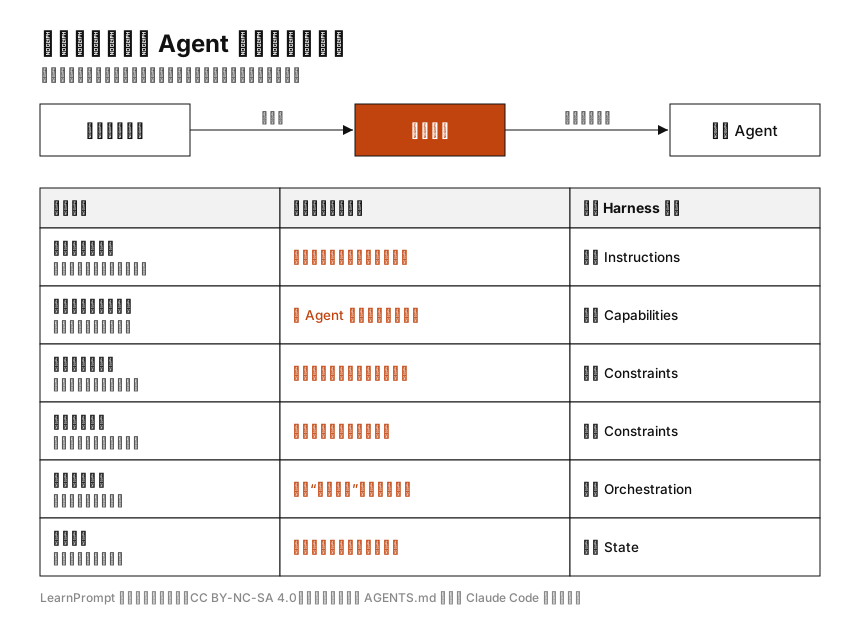 Caption: Pay attention to the relationship in each row: omit any cell and it triggers the predictable failure on the right. Write the checklist once, then reuse it for every task.
Start with a failure: why “help me change it” breaks
Section titled “Start with a failure: why “help me change it” breaks”A vague instruction leaves several key questions unanswered:
- Which repository and branch should be used, and how will a bad change be isolated?
- Which command starts it, and which fastest check proves it did not break?
- Which directories may be changed, and which must never be touched?
- Where do secrets come from, and could they end up in the repository or logs?
- What proves the work is truly complete rather than merely claimed complete by the model?
- How can you safely return to the last good state after failure?
The model can only infer its next step from the context you provide. Omit one cell and it has to guess that cell; a wrong guess becomes the kind of incident described above. Adding “please be careful and maintain quality” cannot fill those engineering gaps—adjectives cannot be executed.
The six-cell kickoff checklist
Section titled “The six-cell kickoff checklist”Turn the six questions above into six cells. This is a minimum but complete kickoff checklist: a human reads one explanation, while a machine reads one project card.
| Required question | What to write | Typical failure when missing | Harness component |
|---|---|---|---|
| Repository and current branch | Where to work and which branch to start from | Random edits on main with no isolated rollback | Instructions |
| Runtime and fastest check | How to run it and which check to use first | The agent guesses commands and repeatedly trial-and-errors | Capabilities |
| Allowed and forbidden paths | What may be touched and what must never be touched | Changes land in the wrong files and scope drifts | Constraints |
| Secret delivery | Where credentials are injected and where they must not remain | Secrets enter the repo or leak into logs | Constraints |
| User acceptance path | Which command or manual check determines completion | You only ask whether it is done, with no objective signal | Orchestration |
| Rollback method | How uncommitted and committed work are separately reverted | A bad change cannot be recovered and must be endured | State |
These six cells are not template worship. They correspond to three mechanisms repeatedly emphasized by primary sources.
Mechanism 1: specific executable instructions beat adjectives
Section titled “Mechanism 1: specific executable instructions beat adjectives”The AGENTS.md standard presents this file as a README for agents. It recommends documenting build and test commands, code style, and safety notes, while emphasizing that agents should run programmatic checks and fix failures before completion. Claude Code’s example is even plainer: write Run npm test before committing, not “Test your changes.” The reason is simple: a command can run and produce an exit code; an adjective cannot. The most valuable cell in the checklist is therefore the runnable acceptance command.
Mechanism 2: real boundaries are enforced by tools, not wording
Section titled “Mechanism 2: real boundaries are enforced by tools, not wording”Writing “do not touch .env” in the checklist is only a soft reminder. To turn it into a hard boundary, express it as a rule the tool can enforce. Claude Code’s permission system is explicit: rules are enforced by Claude Code rather than the model, and deny takes precedence over allow. Thus the forbidden-path and secret cells can be written as follows:
{ "permissions": { "deny": ["Read(.env)", "Edit(starlight/src/content/config.ts)", "Bash(git push *)"] }}Read and Edit deny rules follow gitignore semantics. Read(.env) is equivalent to Read(**/.env) and blocks .env at any depth. The checklist expresses intent; the deny rule performs the refusal.
Mechanism 3: an entry point is a map, not an encyclopedia
Section titled “Mechanism 3: an entry point is a map, not an encyclopedia”A checklist is not better because it is longer. Claude Code documentation recommends keeping a single CLAUDE.md to roughly 200 lines; excessive length consumes context and makes contradiction easier. The compromise is to keep navigational six-cell guidance at the entry point and leave details to documents and tests near the code.
A copyable project card
Section titled “A copyable project card”Write the six cells as flat YAML so both people and machines can read it. This example applies to this documentation site:
repo_and_branch: LearnPrompt 文档站,内容改稿分支,不直接提交主分支run_and_check: 站点在 starlight/ 目录,最快检查 cd starlight && npm run buildboundaries: allow: [目标 MDX, research/ 研究包, starlight/public/images] forbid: [content/config.ts, 其它文章, package.json, 部署配置]secrets: 构建不需要密钥;外部凭据走环境变量注入,不写入仓库acceptance: cd starlight && npm run buildrollback: 未提交用 git restore 丢弃;已提交用 git revert 生成反向提交The rollback cell deserves separate attention. Git documentation clearly distinguishes the cases: git revert undoes committed work by creating a new inverse commit while preserving history, so it suits work that is already committed or even pushed. git reset --hard, by contrast, discards uncommitted changes and rewrites history, making it more dangerous. Separate the two cases in the checklist so you do not panic when something fails.
Showcase: validate the checklist as an exit code
Section titled “Showcase: validate the checklist as an exit code”Whether a checklist is complete should not be judged by eye. We wrote a dependency-free Node script, verify-checklist.mjs, which reads the project card and checks cell by cell that fields exist and are nonempty, that forbidden paths include both allow and forbid, and that acceptance is a runnable command. The complete script and examples are in the Showcase directory of this research package.
Environment: Node.js v24.11.0. Commands run inside showcase/; verification date: 2026-07-11.
For a complete project card, the exit code is 0:
$ node verify-checklist.mjs checklist/project-card.yamlPASS repo_and_branch: 已填写PASS run_and_check: 已填写PASS boundaries: 已填写PASS secrets: 已填写PASS acceptance: cd starlight && npm run buildPASS rollback: 已填写PASS summary: 6/6 项开工清单字段齐全exit=0Now deliberately make an incomplete card: remove rollback, write only allow for forbidden paths, and make acceptance “open the page manually and see if there is a problem.” The script immediately blocks it, names every missing item, and exits 1:
$ node verify-checklist.mjs checklist/project-card-incomplete.yamlPASS repo_and_branch: 已填写PASS run_and_check: 已填写PASS secrets: 已填写FAIL 字段 boundaries 缺少子项 forbidFAIL 字段 acceptance 不是可执行命令:手动打开页面看一下有没有问题FAIL 缺失字段 rollback(回滚方式)FAIL summary: 3 项未通过,项目卡不完整exit=1What this result proves
Section titled “What this result proves”- A fully written kickoff checklist can be validated cell by cell into an exit code and connected to a preflight check or CI.
- Whether acceptance is an executable command can be judged mechanically; prose such as “inspect it manually” is rejected.
What it does not prove
Section titled “What it does not prove”- The script checks whether fields are present and whether acceptance resembles a command; it does not guarantee that the content itself is correct.
- Recognizing an acceptance command does not mean it will pass in the target repository; run the real build separately (this article separately verifies
cd starlight && npm run build). - A forbidden path in YAML is only a reminder to people. Actual enforcement still requires deny rules or a sandbox.
When not to spend time on it
Section titled “When not to spend time on it”- For one-off, zero-risk small changes, writing six cells may cost more than it saves; make the change first.
- If you cannot yet say what task success looks like, improve the task definition first, not the checklist format.
- For high-risk actions—publishing, deleting cloud data, sending messages, or changing account settings—a reminder in a checklist is not enough. Add tool enforcement and human approval.
- Do not treat a passing checklist as task completion. It only proves that you wrote everything down, not that it is right; it does not replace real acceptance or human review.
A common anti-pattern: boundaries written only in the prompt
Section titled “A common anti-pattern: boundaries written only in the prompt”The most common mistake is to write statements such as “do not touch secrets” or “do not change configuration” only in a prompt or CLAUDE.md, then assume that makes the work safe. Those are context, not enforcement. The model will usually follow them, but one mistaken judgment or prompt injection can still cross the line. Use two layers instead: write intent in the prompt layer and use deny rules, a sandbox, or hooks to block at the tool layer. Documents explain intent; systems execute refusal.
Exercise: write a card for your next task
Section titled “Exercise: write a card for your next task”Choose a real task, fill in the six cells in no more than ten lines, and run this article’s script on it:
repo_and_branch: 在哪个仓库、哪个分支run_and_check: 怎么跑起来、最快哪条检查boundaries: allow: [能改哪些] forbid: [绝不能碰哪些]secrets: 凭据怎么注入、不该留在哪acceptance: 哪条命令退出码 0 算完成rollback: 未提交怎么退、已提交怎么退The observable completion criterion is that the script returns exit code 0 for a complete card, and returns 1 while naming the missing cell for a card with one deliberately omitted. If you still cannot fill in three of the cells, you are facing a task-definition problem first, not a tool problem.
Sources and further reading
Section titled “Sources and further reading”- AGENTS.md standard: the project-instruction convention for agents, and the primary basis for this article’s checklist content and executable acceptance.
- Claude Code memory (
CLAUDE.md): official documentation that instructions are context rather than enforced configuration, should be concrete and verifiable, and should stay to roughly 200 lines per file. - Claude Code permissions: official documentation that deny rules are enforced by the tool and evaluated deny→ask→allow.
- git revert documentation: the primary official basis for the rollback cell.
- Harness Engineering Orange Book: a Chinese secondary topic map.
Official product documentation and git documentation are the primary sources for the current engineering facts in this article, all rechecked on 2026-07-11. The Orange Book is used only as a Chinese topic map: its repository says educational sharing requires attribution and does not publish a standard open license, so this article retains only its link and attribution and does not copy or adapt its images. The six-component mapping is LearnPrompt’s operational synthesis of several primary sources, not an industry-wide standard.