
How Codex Sandboxes and Approvals Layer: A Least-Privilege Practical Tutorial
| Difficulty | Reading time | Last verified | Author |
|---|---|---|---|
| Beginner | 18 min | 2026-07-11 | LearnPrompt Editorial Team |
You ask Codex to fix a documentation link, while the repository contains both docs/link.md and a sensitive .env. The most common mistake at this point is not writing the wrong command; it is immediately treating “do not keep stopping to ask me” and “give it broader local permissions” as the same thing.
People then tend to make one of two risky moves:
- Switch straight to
danger-full-accessbecause approval interrupts their flow. - Put every task in an overly conservative read-only mode out of fear, so even ordinary editing cannot move forward.
Both reactions skip the question that should come first: which paths and network resources do your local commands physically need to touch? Which actions merely deserve another question, rather than a wider OS boundary?
Using official OpenAI documentation current as of 2026-07-11, local codex-cli 0.142.2 help, and a model-free, deterministic docs-link-fix permission lab, this tutorial separates those two control layers.
What you will be able to do after reading
Section titled “What you will be able to do after reading”You will have four things you can use directly:
- A stable decision order: assess task risk first, then choose a sandbox/profile, then configure approval—instead of selecting full access first.
- A reproducible set of probes: what
:read-only,:workspace, and a customdocs-editeach block and allow. - A minimal TOML template: inherit from
:workspace, allow only docs editing, and explicitly deny reading**/*.env. - One hard conclusion:
approval_policy = "never"only makes the agent stop asking; it does not suddenly make denied files readable or writable.
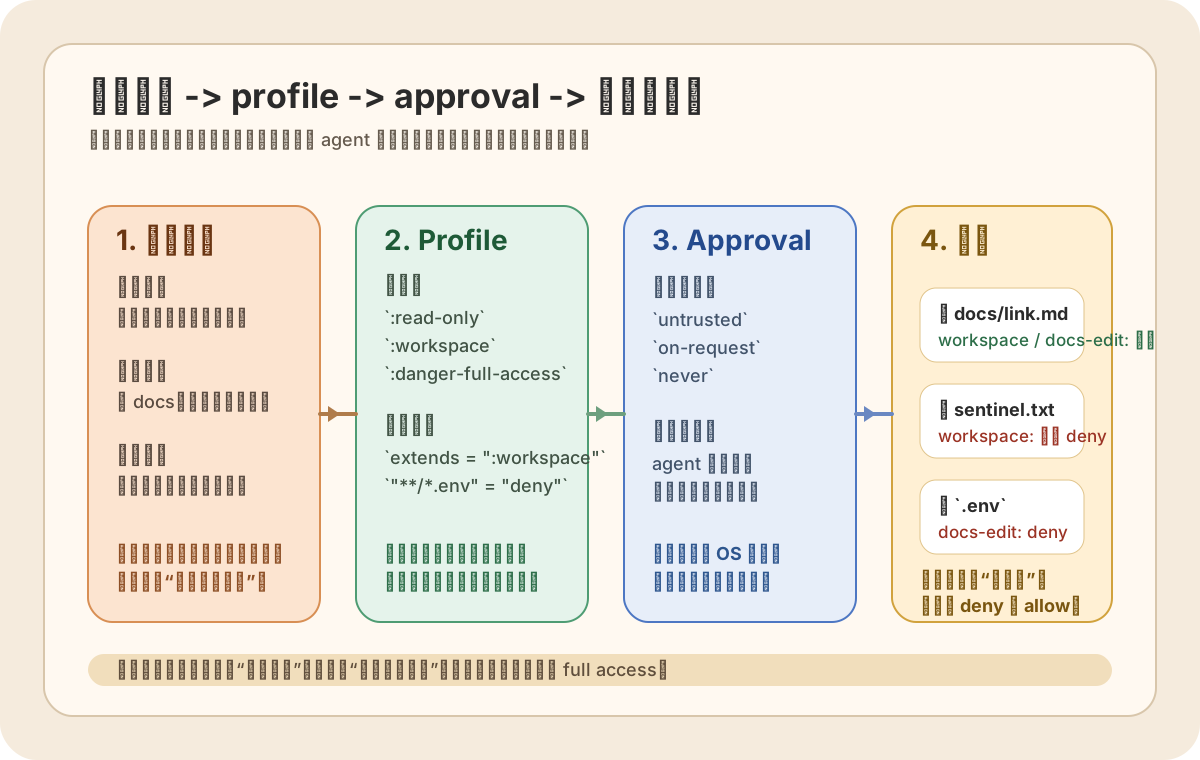 Caption: The correct least-privilege order is “task risk -> profile -> approval -> outcome.” The profile determines what local commands can reach; approval determines whether the agent stops to ask first. Neither can impersonate the other.
First separate the two questions: the sandbox answers “what can it touch,” and approval answers “when does it stop to ask?”
Section titled “First separate the two questions: the sandbox answers “what can it touch,” and approval answers “when does it stop to ask?””Remember this sentence first:
The reachability boundary of a local command is one question; the agent’s interaction timing is another.
If you do not separate them, you will keep tying “interrupt me less” to “give me broader permissions.” In Codex, however, these are handled by different control planes:
| The question you actually want to ask | Corresponding control layer | What it controls | What it cannot control |
|---|---|---|---|
Can this command write docs/link.md? Can it read .env? Can it write outside the workspace? | sandbox / permission profile | Filesystem boundaries, network boundaries, and the physical reach of local commands | Whether the agent should ask you to confirm first |
| When the agent reaches this point, should it stop and ask me? | approval policy | When to escalate to a human, continue automatically, or fail and return directly | It does not automatically broaden file or network permissions |
| Should a command prefix force a prompt or be prohibited directly? | rules / prefix rules | Session governance and extra command-prefix restrictions | It is not an OS sandbox and cannot turn deny into allow |
These three layers can coexist, but their order cannot be reversed. The local sandbox or profile is at the bottom because it is the mechanical boundary; approval and rules sit above it because they only determine how to handle an attempt within that boundary.
Why this is especially easy to confuse in practice
Section titled “Why this is especially easy to confuse in practice”In the interface, you often see terms such as “permissions,” “approval,” “automatic execution,” and “full access.” They all look like risk switches, but they belong to different layers.
One particularly typical misunderstanding is:
- Misunderstanding: if I change
approval_policytonever, the agent is more “unrestricted.” - Reality:
neveronly means do not show a human confirmation. If the profile explicitly denies.env, the command still directly receivesOperation not permitted.
The three probes later in this article will demonstrate this with real exit codes.
The factual layer as of 2026-07-11: old sandbox settings and Beta permission profiles are not one system
Section titled “The factual layer as of 2026-07-11: old sandbox settings and Beta permission profiles are not one system”The most misleading part of this page’s old short draft was treating “sandbox” and “permission mode” as a broad single concept. But as of 2026-07-11, Codex’s official materials and local 0.142.2 CLI actually expose two configuration surfaces at once:
| Surface | Where you see it | What it represents | How this tutorial uses it |
|---|---|---|---|
| Old sandbox settings | `—sandbox read-only | workspace-write | danger-full-accessincodex —help` |
| approval policy | `—ask-for-approval untrusted | on-request | neverincodex —help` |
| Beta permission profiles | Official Permissions and --permissions-profile in codex sandbox --help | Finer-grained local file/network policies | All Showcase runs in this article are based on this layer |
The official Permissions page draws the boundary clearly: for ordinary local, non-managed configuration stacks, permission profiles do not combine with old sandbox settings. You either configure default_permissions and [permissions.<name>], or use the old sandbox_mode / sandbox_workspace_write settings; if any loaded config, selected config profile, or CLI --sandbox still sets an old mode, Codex continues to use the old settings.
There is one official exception: managed allowed_permission_profiles switches Codex to the permission-profile system for enterprise-managed rollouts. This article discusses only the ordinary local lab and does not expand into deployment details for managed requirements.
This is not terminology pedantry; it prevents two kinds of mistakes:
- You think you are testing a custom profile when an old
sandbox_modeis actually still in effect. - You think
--ask-for-approval neveralso loosens the profile, when in fact it merely stops showing confirmations.
What the local 0.142.2 help surface tells us
Section titled “What the local 0.142.2 help surface tells us”Local codex --help explicitly lists:
--sandbox read-only|workspace-write|danger-full-access--ask-for-approval untrusted|on-request|never
Local codex sandbox --help explicitly lists:
--permissions-profile <NAME>--log-denials
This tells us two things:
- In the interactive CLI’s default user-facing surface, the old sandbox/approval combination remains the primary entry point.
- If you want a model-free, deterministic local permission experiment, the most direct tool is not opening an agent session, but invoking
codex sandboxseparately and explicitly selecting a profile.
Choose least privilege with a risk chain instead of treating high privilege as the default
Section titled “Choose least privilege with a risk chain instead of treating high privilege as the default”The truly stable order is not “do I want the agent to do more today?” It is these four steps:
- Task risk: will this action touch ordinary documents, sensitive configuration, or irreversible external systems?
- Local boundary: which paths must the command physically read and write, and which networks must it access?
- Approval policy: among those actions, which may run automatically and which must stop to ask at a critical moment?
- Observable result: if it fails, what evidence do I expect to distinguish being stopped for approval from being blocked by the OS?
You can first broadly classify common tasks like this:
| Task | Recommended minimum profile | Recommended approval approach | Why not higher privilege |
|---|---|---|---|
| Read-only repository understanding, finding entry points, answering questions | :read-only | on-request or untrusted | Without a writing need, writing permission should not be granted first |
Editing documentation or local code when the repository contains .env | Custom profile inheriting :workspace, with deny on **/*.env | on-request | Ordinary files are writable while sensitive reads remain hard-blocked |
| Ordinary editing and builds only in the current workspace | :workspace | on-request | Workspace access is already sufficient; local boundaries need not be removed |
| An action that genuinely needs broader local privileges | :danger-full-access, but use it only where the outer environment is disposable and there is a human gate | Approval and rollback must still be designed separately | Full access only removes the local sandbox; it does not solve business risk for you |
The most important sentence here is: full access is not “a more convenient workspace”; it is “removing this layer of local OS protection.”
Showcase setup: why the docs-link-fix lab is arranged this way
Section titled “Showcase setup: why the docs-link-fix lab is arranged this way”This Showcase centers on one small question: if I need to fix docs/link.md while the same workspace also contains a .env path that must be deny-read, how can I prove that “writable docs” and “refusing to read sensitive paths” are two independent control layers? To keep the .env checksum and frozen output stable across consecutive runs, the lab deterministically generates test markers at runtime from a fixed, non-sensitive seed. It contains no real credential-shaped values and does not freeze the marker’s key/value into the research package.
The lab layout is:
<lab-root>/ workspace/ docs/link.md .env sentinel.txt home/.codex/config.tomlThree design choices deserve specific explanation.
1. Why sentinel.txt is a sibling of the workspace
Section titled “1. Why sentinel.txt is a sibling of the workspace”Because we are not testing “can another file be written?” We are testing whether the profile allows writing a path outside the workspace. Placing sentinel.txt as a sibling of workspace lets probe 2 demonstrate with the smallest command:
docs/link.mdis inside the workspace and writable.../sentinel.txthas crossed the boundary and should be refused.
2. Why the lab itself cannot live in os.tmpdir()
Section titled “2. Why the lab itself cannot live in os.tmpdir()”This is the most valuable failure mode in this writing. The official Permissions page is explicit: built-in :workspace allows writes to active workspace roots and system temporary directories. That means if you also place the “outside-workspace sentinel” in /tmp or macOS TMPDIR, you think you are testing an out-of-bounds write while you are actually still inside an allowed area.
The formal lab therefore lives under the home directory, while raw logs live only in os.tmpdir(). This both satisfies “write raw output outside the working tree first” and prevents the out-of-bounds write experiment from being invalidated.
3. Why the config fixes approval_policy = "never"
Section titled “3. Why the config fixes approval_policy = "never"”It is not meant to “open up permissions”; it makes the experiment a non-interactive, repeatable deterministic probe. That way all three runs directly return exit codes and denials, rather than mixing results with another layer because an approval prompt appeared in the middle.
The custom profile configuration for this run is:
approval_policy = "never"default_permissions = "docs-edit"
[permissions.docs-edit]extends = ":workspace"
[permissions.docs-edit.filesystem]glob_scan_max_depth = 4
[permissions.docs-edit.filesystem.":workspace_roots"]"**/*.env" = "deny"
There are two key points here:
extends = ":workspace": preserves normal editing ability inside the workspace."**/*.env" = "deny": separately blocks reads of sensitive files in the same profile.
glob_scan_max_depth = 4 explicitly satisfies the config reference’s expansion requirement for deny-read globs, avoiding ambiguity in the experiment’s interpretation due to platform differences.
The research package’s showcase/run-probes.sh has condensed this flow into one command: it creates two one-time labs consecutively under the user’s home directory, writes raw captures under os.tmpdir(), runs the three probes in sequence, generates checksum-manifest.md / probe-results.md first, then performs an expected comparison with CHECKSUM_MANIFEST_EXPECTED. Results are frozen only when verifier-output.txt contains checksum_manifest_matches_expected=yes and replay-stability.txt records stable=yes for all four frozen outputs.
Probe 1: :read-only fails to write docs/link.md, exit code 1
Section titled “Probe 1: :read-only fails to write docs/link.md, exit code 1”The first probe asks only one minimal question: under :read-only, can it directly append to a file inside the workspace?
The command is:
HOME=<lab-root>/home \codex sandbox --log-denials \ --permissions-profile :read-only \ --cd <lab-root>/workspace \ /bin/sh -lc 'printf "probe-1\n" >> docs/link.md'The minimal redacted output is:
/bin/sh: docs/link.md: Operation not permitted(bash) file-write-data <LAB_ROOT>/workspace/docs/link.mdActual result:
- Exit code:
1 docs/link.mdis unchangedsentinel.txtdoes not participate in this probe- SHA-256 values for the three logical files at
initial/probe1are in the committedresearch/articles/sandbox-and-permissions/showcase/checksum-manifest.md
The value of this probe is not the commonplace statement that “read-only cannot write.” It establishes a baseline for the two later points:
- In the same lab, the profile is mechanically blocking write operations.
- The failure signal is an explicit exit code and denial, not a model that “decides not to modify it for now.”
In other words, there is no need here to guess the agent’s subjective intent. The underlying layer has made the boundary fixed.
Probe 2: :workspace can write docs, but writing outside the boundary to sentinel.txt fails
Section titled “Probe 2: :workspace can write docs, but writing outside the boundary to sentinel.txt fails”The second probe specifically verifies whether the boundary “inside the workspace allowed, outside the workspace refused” is clear.
The command is:
HOME=<lab-root>/home \codex sandbox --log-denials \ --permissions-profile :workspace \ --cd <lab-root>/workspace \ /bin/sh -lc 'printf "probe-2\n" >> docs/link.md && printf "probe-2\n" >> ../sentinel.txt'Notice that the two actions are deliberately placed in the same shell: write docs/link.md first, then write its sibling sentinel.txt. If the profile boundary is correct, we should see “the former succeeds, the latter fails” within the same probe.
The minimal redacted output is:
/bin/sh: ../sentinel.txt: Operation not permitted(bash) file-write-data <LAB_ROOT>/sentinel.txtActual result:
- Exit code:
1 docs/link.mdsuccessfully hasprobe-2appended- The
sentinel.txtchecksum matches its initial value and was not modified - SHA-256 values for
docs/link.md,sentinel.txt, and.envatinitial/probe1/probe2are in the committedchecksum-manifest.md
This is a good example of “least privilege is not least capability.” :workspace does not leave the task stuck in read-only mode; it still allows you to complete editing inside the current workspace. But once you attempt to touch a sibling file outside the workspace, the OS boundary blocks it.
This step also explains why you should not jump directly to danger-full-access. When your actual goal is only to edit docs, :workspace is sufficient; removing the local boundary as well only increases the blast radius instead of adding necessary capability.
Probe 3: custom docs-edit inherits :workspace, but refuses to read .env
Section titled “Probe 3: custom docs-edit inherits :workspace, but refuses to read .env”The third probe is the real center of this tutorial: we do not merely want to prove that “a boundary exists”; we also want to prove that you can slice the boundary more finely than “read-only / entire workspace writable / completely open.”
The command is:
HOME=<lab-root>/home \codex sandbox --log-denials \ --permissions-profile docs-edit \ --cd <lab-root>/workspace \ /bin/sh -lc 'printf "probe-3\n" >> docs/link.md && cat .env > /dev/null'Again, the two actions are deliberately placed in one probe:
- First write the ordinary document
docs/link.md. - Then read the sensitive
.env.
If the docs-edit profile really tightens only the .env path without affecting ordinary docs editing, we should see:
- Writing docs succeeds.
- Reading
.envfails. - The exit code is non-zero.
- The runtime test marker in
.envdoes not appear in logs.
The minimal redacted output is:
cat: .env: Operation not permitted(cat) file-read-data <LAB_ROOT>/workspace/.envActual result:
- Exit code:
1 docs/link.mdsuccessfully hasprobe-3appended- The
.envchecksum matches its initial value sentinel.txtalso remains unchanged
The summary from the one-command verifier is:
config_rc=0probe1_rc=1probe2_rc=1probe3_rc=1link_probe1_matches_initial=yeslink_probe2_differs_from_probe1=yeslink_probe3_differs_from_probe2=yessentinel_unchanged=yesenv_unchanged=yesfixture_marker_in_logs=nochecksum_manifest_matches_expected=yesThe same runner invocation also writes replay-stability.txt, listing the SHA-256 values for the two consecutive generations of environment.txt, checksum-manifest.md, probe-results.md, and verifier-output.txt side by side, and requiring final stable=yes.
The committed checksum-manifest.md lists all SHA-256 values for docs/link.md, sentinel.txt, and .env at initial / probe1 / probe2 / probe3. Without touching the original temporary directory, a reviewer can independently prove three things:
:read-onlydid not modifydocs/link.md:workspaceanddocs-editboth let onlydocs/link.mdprogress as expectedsentinel.txtand.envwere not modified on any of the three failure paths
The meaning of this step is greater than “.env was refused.” It tells you: least privilege is not achieved through process reminders; a profile can directly cut away the sensitive surface while retaining the writing capability the current task truly needs.
For common tasks such as docs work, refactoring, and local code fixes, this usually matches the real risk structure better than “either all read-only, all workspace-writable, or full access.”
Why this article does not actually run :danger-full-access
Section titled “Why this article does not actually run :danger-full-access”When many tutorials discuss full permissions, they want to prove how powerful it is by “really writing an outside-workspace file once.” This article deliberately does not do that, because that is no longer a boundary demonstration; it is a real grant of authority.
The official documentation’s definition of danger-full-access is already clear enough:
- It removes local sandbox restrictions.
- In other words, this layer no longer protects local filesystem and network boundaries.
With that premise, running an experiment where an out-of-bounds sentinel write succeeds adds no teaching value; it merely truly performs an action that should otherwise have been blocked.
It is more valuable to make the usage constraints clear:
- The environment must be disposable, or already have outer container/VM isolation.
- The task goal, allowed paths, and rollback approach must be frozen first.
- Irreversible actions need a separate human gate; a “please be careful” prompt alone is insufficient.
- Diffs, logs, build output, or reviewer evidence must be retained so the result is auditable.
If you cannot answer any one of these four items, the problem is usually not “whether the CLI can give broader permissions,” but “whether this task has met the conditions for safe delegation.”
How to configure approval policy without mistaking “never ask” for “broader permissions”
Section titled “How to configure approval policy without mistaking “never ask” for “broader permissions””At this point, we can return to the second control layer. According to local codex --help and the official config reference, common approval policies include at least:
| Policy | Effect | Appropriate for | Never mistake it for |
|---|---|---|---|
untrusted | Known-safe read operations run automatically; other high-risk or untrusted actions ask | Interactive exploration where you want to retain a human gate | “It automatically broadens the profile” |
on-request | The agent decides when it needs escalation | You are willing to let the agent judge the pace | “It can define OS boundaries for you” |
never | No human confirmation; failures return directly | Non-interactive probes, CI, deterministic scripts | “It is equivalent to full access” |
You can think of it as a traffic light for “when to stop and ask,” not a bulldozer that removes roadblocks.
This is also why the three probes in this article, although they fix approval_policy = "never", all still receive refusal results with exit code = 1. Approval never enters the picture, while the boundary remains; that is because the boundary comes from the profile, not a confirmation dialog.
Prompt rules cannot impersonate an OS sandbox either
Section titled “Prompt rules cannot impersonate an OS sandbox either”If you add rules.prefix_rules[].decision = "prompt" to config.toml or requirements, you add a process gate: whether certain command prefixes must be asked about again, or are directly prohibited.
That certainly has value, but it solves a different type of problem:
- It answers “should this command be attempted?”
- It does not answer “even if attempted, can the underlying layer touch
.envor a path outside the workspace?”
The truly safe order remains:
- First narrow the profile to the minimum.
- Then let approval decide when to escalate.
- Finally use rules for additional organization-level governance.
When these three layers are mixed into one, teams are most prone to this accident: they merely want to stop clicking “Approve” so frequently, but end up removing the local boundary as well.
A least-privilege decision table: do not start from full access next time
Section titled “A least-privilege decision table: do not start from full access next time”The next time you face “what permissions should this run have?”, do not look at mode names first. Answer these four questions first:
- Where must this command write? Are there sensitive files that require an explicit deny?
- Are any outside-workspace, network, or irreversible actions genuinely necessary?
- Do I want the agent to continue automatically, or stop and ask at critical points?
- If it fails, what kind of evidence do I expect: an approval request, exit code, diff, log, or build result?
When you can answer these four questions clearly, the permission choice usually converges naturally:
- Read-only exploration:
:read-only - Ordinary editing inside the workspace:
:workspace - Need to avoid secrets while doing ordinary editing: custom profile inheriting
:workspaceplus deny rules - A truly broader boundary is needed: discuss
:danger-full-accessonly last
This is the old habit this article most wants to replace: do not make high privilege the default and then try to compensate with “I will be careful.” Make least privilege the default, and raise it only when the task proves it needs a broader boundary.
Exercise: write your current task as a “two-layer control card”
Section titled “Exercise: write your current task as a “two-layer control card””Choose a real task and compress it into this card:
risk: files: network: irreversible_actions:profile: base: extra_allow: explicit_deny:approval: policy: human_gate:evidence: first_check: final_check:If you cannot write explicit_deny, ask whether you have conceptualized the sensitive surface too broadly; if you cannot write human_gate, ask whether you have mixed approval and profile together again.
Sources and further reading
Section titled “Sources and further reading”- Official documentation: Sandbox
- Official documentation: Agent approvals & security
- Official documentation: Permissions
- Official documentation: Managed configuration (used only to explain the managed
allowed_permission_profilesexception) - Official documentation: Configuration Reference
- Local first-party help:
codex --help,codex sandbox --help(codex-cli 0.142.2; excerpts are inresearch/articles/sandbox-and-permissions/showcase/environment.txt) - Secondary topic map: alchaincyf/codex-orange-book
Official materials and local help support this article’s current factual layer. Orange Book is used only as an old-draft clue and Chinese topic map, not as authority for 2026-07 behavior. Attribution and the CC BY-NC-SA 4.0 license notice are retained in accordance with alchaincyf/codex-orange-book and this repository’s LICENSE; this article’s structure, reasoning, experiment, and illustration have been reorganized and re-verified.